Skip to content
View in the app

A better way to browse. Learn more.

BariatricPal

A full-screen app on your home screen with push notifications, badges and more.

To install this app on iOS and iPadOS
  1. Tap the Share icon in Safari
  2. Scroll the menu and tap Add to Home Screen.
  3. Tap Add in the top-right corner.
To install this app on Android
  1. Tap the 3-dot menu (⋮) in the top-right corner of the browser.
  2. Tap Add to Home screen or Install app.
  3. Confirm by tapping Install.

Progress graph

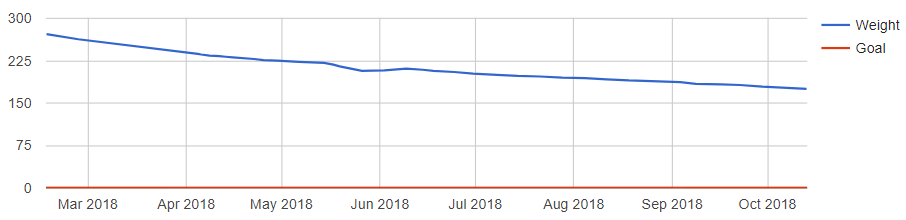
Even though I have set my goal weight to 150#, the graph shows it to be 0. How can I get the goal line to show at 150? Thanks!

image.png.b9896dbd93192ac21a9b7edc5cbf88b6.png

  • Replies 15
  • Views 3.5k
  • Created
  • Last Reply

Top Posters In This Topic

Most Popular Posts

Posted Images

Featured Replies

The graph is setting a pretty ambitious goal for you. I say go for it! (just kidding) haha...

  • Author
1 minute ago, Ed_NW said:

The graph is setting a pretty ambitious goal for you. I say go for it! (just kidding) haha...

Yeah, not quite sure I'm up to it!

Help with entering in my surgery information and weight, I’ve tried everything, can anyone please advise.

thank you!

  • Author
2 hours ago, Alex Brecher said:

Thanks for reporting this issue! Our developers will correct this in a few days.

Thank you!

8 hours ago, Orchids&Dragons said:

Even though I have set my goal weight to 150#, the graph shows it to be 0. How can I get the goal line to show at 150? Thanks!

image.png.b9896dbd93192ac21a9b7edc5cbf88b6.png

Where did you get this graph from?

  • Author
1 hour ago, Matt Z said:

Where did you get this graph from?

OK, I use a "regular" computer, so YMMV - On the same page where we enter updates for our weight, there is a bar with 4 little icons on it. It shows the graph, a listing of dates/weights, a milestone tracker and something else, I think. It plots out every time you've updated your weight along the way.

Edited by Orchids&Dragons

15 hours ago, Orchids&Dragons said:

OK, I use a "regular" computer, so YMMV - On the same page where we enter updates for our weight, there is a bar with 4 little icons on it. It shows the graph, a listing of dates/weights, a milestone tracker and something else, I think. It plots out every time you've updated your weight along the way.

AH, Chart View... forgot about that... yeah my goal is at 0 lbs as well LOL

  • Author
1 minute ago, Matt Z said:

AH, Chart View... forgot about that... yeah my goal is at 0 lbs as well LOL

Talk about developing an unhealthy weight obsession . . .

Thanks again Matt, by the way, Rhode Island girl myself, moved away in 89 but come back bi monthly to see family...last time I pigged out at iggys..lol before surgery of course.

thanks again

The charts should be fixed now. Thanks for letting me know about that issue. We are going to be releasing a massive update to health and fitness tracking on our app first quarter of 2019.

  • Author
4 hours ago, Alex Brecher said:

The charts should be fixed now. Thanks for letting me know about that issue. We are going to be releasing a massive update to health and fitness tracking on our app first quarter of 2019.

Thank you so much! It's working perfectly!

Still don’t have a chart? Is it something I have to install?

4 hours ago, JacquieK said:

Still don’t have a chart? Is it something I have to install?

Hi @JacquieK - the chart view can be access here: https://www.bariatricpal.com/patients/portal/?do=chart

Please let me know if that helps ?

Hi takes me to my graph where I’ve been entering in my weight. But does not show up on my profile

Join the conversation

You can post now and register later. If you have an account, sign in now to post with your account.

Guest
Reply to this topic...

Trending Products

PatchAid Vitamin Patches

Account

Navigation

Search

Search

Configure browser push notifications

Chrome (Android)
  1. Tap the lock icon next to the address bar.
  2. Tap Permissions → Notifications.
  3. Adjust your preference.
Chrome (Desktop)
  1. Click the padlock icon in the address bar.
  2. Select Site settings.
  3. Find Notifications and adjust your preference.