Skip to content
View in the app

A better way to browse. Learn more.

BariatricPal

A full-screen app on your home screen with push notifications, badges and more.

To install this app on iOS and iPadOS
  1. Tap the Share icon in Safari
  2. Scroll the menu and tap Add to Home Screen.
  3. Tap Add in the top-right corner.
To install this app on Android
  1. Tap the 3-dot menu (⋮) in the top-right corner of the browser.
  2. Tap Add to Home screen or Install app.
  3. Confirm by tapping Install.

just a quick hello

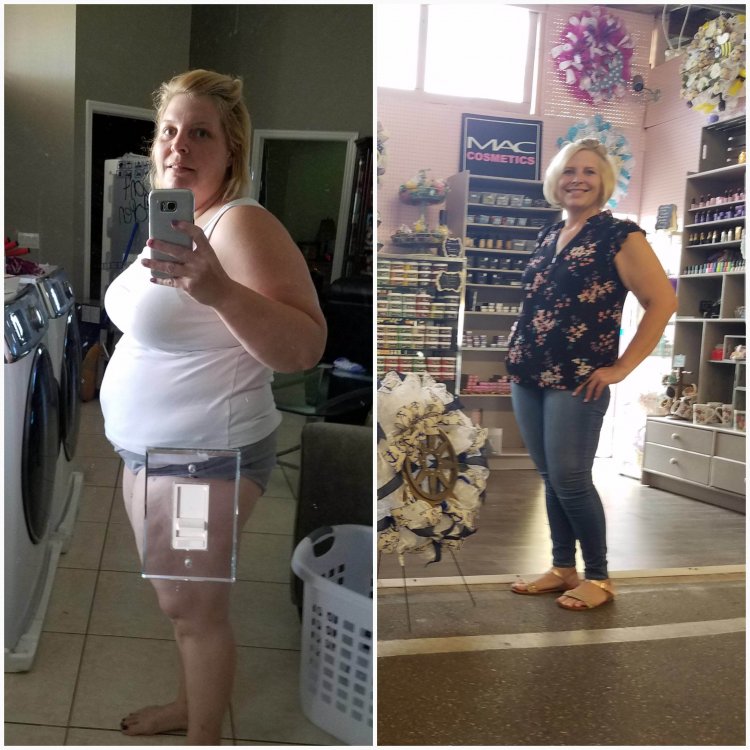
Hey all just wanted to update you on what’s going on lately. I reached my first goal of 175. I struggled with a loooooonnnnnngggggg stall. So I went back to the basics. Protein shakes, yogurt, water. Now I’ve crushed my first goal and on to the final. 150! I am at 164 and so happy. Thanks for reading.

Hw 289
Sw 243
Cw 164
Goal w 150

image-0.00905990600585938.jpg

  • Replies 3
  • Views 1.3k
  • Created
  • Last Reply

Top Posters In This Topic

Most Popular Posts

  • You are where my Final goal will be. Thank you for the picture of what I might look like. I needed that Hope Transplant Today!

Posted Images
Featured Replies

That's awesome. Congrat's to you, you look great!!!!

Good for you! Looking good!

You are where my Final goal will be. Thank you for the picture of what I might look like. I needed that Hope Transplant Today!

Join the conversation

You can post now and register later. If you have an account, sign in now to post with your account.

Guest
Reply to this topic...

Trending Products

PatchAid Vitamin Patches

Account

Navigation

Search

Search

Configure browser push notifications

Chrome (Android)
  1. Tap the lock icon next to the address bar.
  2. Tap Permissions → Notifications.
  3. Adjust your preference.
Chrome (Desktop)
  1. Click the padlock icon in the address bar.
  2. Select Site settings.
  3. Find Notifications and adjust your preference.