Skip to content
View in the app

A better way to browse. Learn more.

BariatricPal

A full-screen app on your home screen with push notifications, badges and more.

To install this app on iOS and iPadOS
  1. Tap the Share icon in Safari
  2. Scroll the menu and tap Add to Home Screen.
  3. Tap Add in the top-right corner.
To install this app on Android
  1. Tap the 3-dot menu (⋮) in the top-right corner of the browser.
  2. Tap Add to Home screen or Install app.
  3. Confirm by tapping Install.

Almost 1 month out

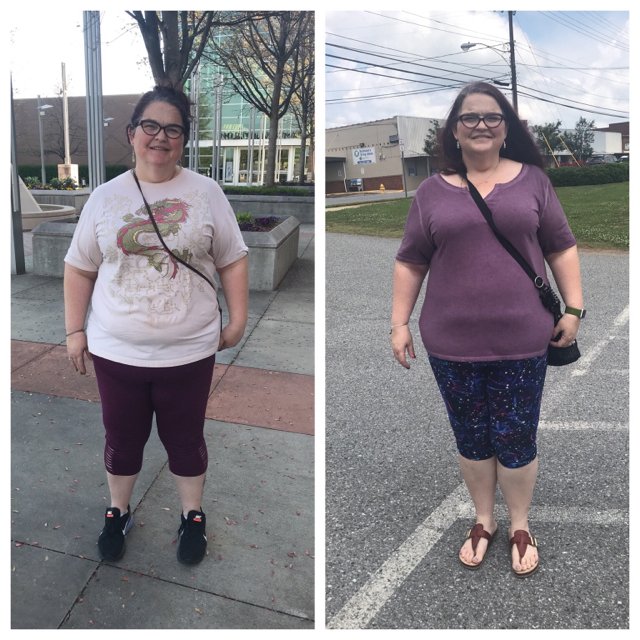
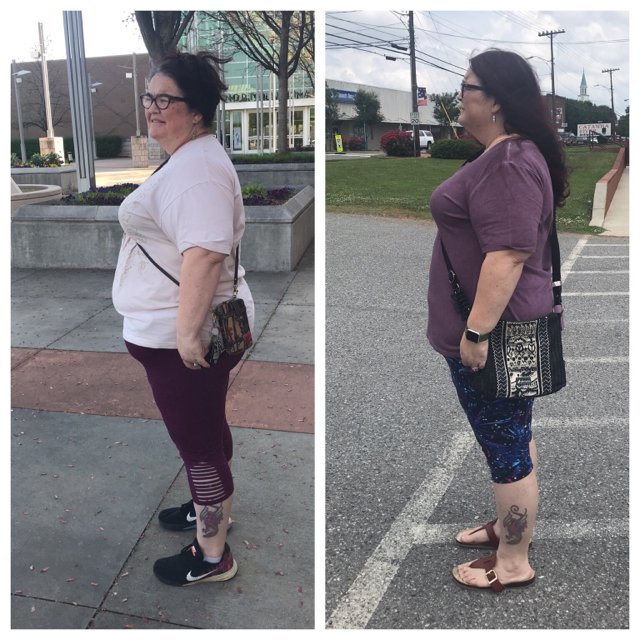
So I’ve been having trouble seeing the difference .... but others see it so my friend had me do a side by side. IMG_6187.JPGIMG_6188.JPG.

I see some improvement. I know I’m loosing inches because my shorts are falling down

Melissa

HW. 285

Sw. 265. Sleeved 4/26/2018

CW 252

Gw 150ish

5’5”

  • Replies 10
  • Views 1.3k
  • Created
  • Last Reply

Featured Replies

I love to see everyone's progress! I can totally see the difference!! Your stomach and face are smaller! Congrats to you!! You're doing great!!

Less than 1 month, way to go!

Thank you for posting. I just had surgery and it makes me feel like the stupid liquid diet and fighting head hunger/cravings will all be worth it very soon.

So encouraging! Thank you!

Congratulations on your surgery. Look at your shoulders in the two pictures. It definately is beginning to transform you.

You look wonderful. Definately a difference. Congrats!!!!

It's hard to see when it's YOU but believe you me You are rocking it, slow and steady, but a definate change. If others don't they need their eyeglass lenses changed. I hope my own will start out so good, I'm. still a plump and portly princess but I still plan to be the Empress of All Things Thin after a while! And I'll let you rule with me, okay?
For a month, that is amazing!

Archived

This topic is now archived and is closed to further replies.

Trending Products

PatchAid Vitamin Patches

Account

Navigation

Search

Search

Configure browser push notifications

Chrome (Android)
  1. Tap the lock icon next to the address bar.
  2. Tap Permissions → Notifications.
  3. Adjust your preference.
Chrome (Desktop)
  1. Click the padlock icon in the address bar.
  2. Select Site settings.
  3. Find Notifications and adjust your preference.