Skip to content
View in the app

A better way to browse. Learn more.

BariatricPal

A full-screen app on your home screen with push notifications, badges and more.

To install this app on iOS and iPadOS
  1. Tap the Share icon in Safari
  2. Scroll the menu and tap Add to Home Screen.
  3. Tap Add in the top-right corner.
To install this app on Android
  1. Tap the 3-dot menu (⋮) in the top-right corner of the browser.
  2. Tap Add to Home screen or Install app.
  3. Confirm by tapping Install.

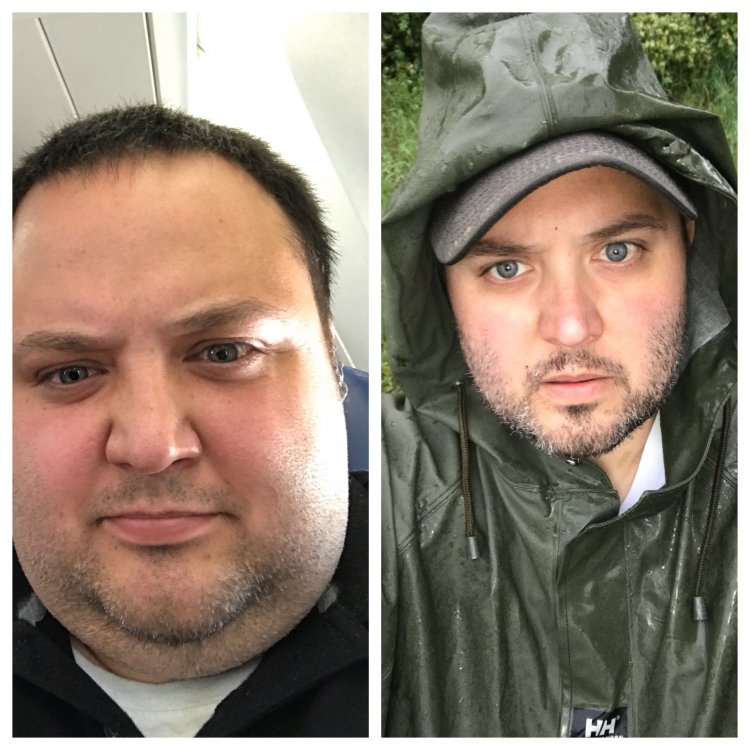
Face 2 Face Friday (Rainy Day Edition)

Starting Weight: 333 lbs

Surgery Date: 02/22/18

Current Weight: 248 lbs

Mood: Singing in the rain

57C7F43F-9C8F-4C25-818D-E6698991B8C2.jpeg

  • Replies 5
  • Views 681
  • Created
  • Last Reply

Featured Replies

Are you kidding me! NO WAY that is the same person! The first guy looks a little angry, but the second guy is cute. Quit trolling for chicks!

Just kidding, you look amazing! That is a huge change in a short period. Do you do a double take when you look in the mirror?

Great job!

First pic was at my highest weight of 345lbs, and the second is 3 months post op at 87lbs (roughly).

large.before.jpeg.fed58f7ef076086b82c6271a678b620d.jpeg

large.after.jpeg.ba7f9b791b1fc97278c45d937f4eae59.jpeg

44 minutes ago, FatGuy5000 said:

Starting Weight: 333 lbs

Surgery Date: 02/22/18

Current Weight: 248 lbs

Mood: Singing in the rain

57C7F43F-9C8F-4C25-818D-E6698991B8C2.jpeg

Wow,u look amazing!

21 minutes ago, AshAsh1 said:

First pic was at my highest weight of 345lbs, and the second is 3 months post op at 87lbs (roughly).

large.before.jpeg.fed58f7ef076086b82c6271a678b620d.jpeg

large.after.jpeg.ba7f9b791b1fc97278c45d937f4eae59.jpeg

I can't believe the differences in such a short time! U look great!

Ash Ash you look like you are emerging into the sunlight after a dark stormy night, I joyfully cheer how you're looking now!??

Archived

This topic is now archived and is closed to further replies.

Account

Navigation

Search

Search

Configure browser push notifications

Chrome (Android)
  1. Tap the lock icon next to the address bar.
  2. Tap Permissions → Notifications.
  3. Adjust your preference.
Chrome (Desktop)
  1. Click the padlock icon in the address bar.
  2. Select Site settings.
  3. Find Notifications and adjust your preference.