Skip to content
View in the app

A better way to browse. Learn more.

BariatricPal

A full-screen app on your home screen with push notifications, badges and more.

To install this app on iOS and iPadOS
  1. Tap the Share icon in Safari
  2. Scroll the menu and tap Add to Home Screen.
  3. Tap Add in the top-right corner.
To install this app on Android
  1. Tap the 3-dot menu (⋮) in the top-right corner of the browser.
  2. Tap Add to Home screen or Install app.
  3. Confirm by tapping Install.
  • Appearance

Join BariatricPal free

  • Ask your own questions
  • Reply and follow topics
  • Message other members
  • No cost, no spam

The pop up Ads are slowing down my computer

Yea I get that you want to sell stuff, and I do buy things from your store, please for the love of God stop the popups when I am on the forum, it's slowing down my browser I've tried three just to check, it's bloatware on your webpage, annoying as all get out, and distracting. Please rethink the ads. Thanks.

  • Replies 9
  • Views 1.8k
  • Created
  • Last Reply

Top Posters In This Topic

Most Popular Posts

  • Alex Brecher
    Alex Brecher

    Ok, I've disabled this "pop up" box. We appreciate your feedback!

  • Hannah83
    Hannah83

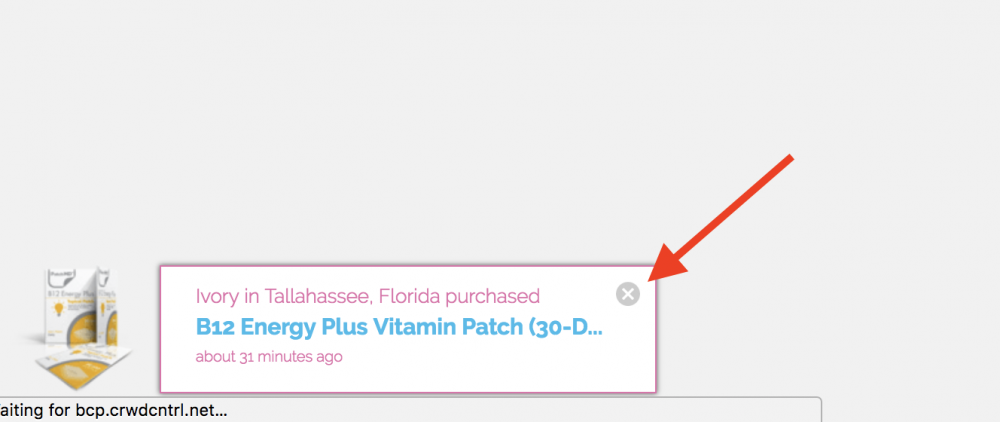
    got it, thanks, Alex. Hitting the x helped. Still annoying as hell.

  • ProudGrammy
    ProudGrammy

    @Alex Brecher it's a pain having to stop what we're writing or reading to push that X kathy

Posted Images
Featured Replies

25 minutes ago, Hannah83 said:

Yea I get that you want to sell stuff, and I do buy things from your store, please for the love of God stop the popups when I am on the forum, it's slowing down my browser I've tried three just to check, it's bloatware on your webpage, annoying as all get out, and distracting. Please rethink the ads. Thanks.

We do not have any pop-ups on our forums! Which ads are you referring to?

I constantly have pop-ups too and they are very frustrating. Every few “seconds” I see a pop up of every purchase made along with a small photo of the product. Cynthia in Tampa, Florida just purchased . . . ”. “Susan in Syracuse, Indiana purchased... “. “Leah in Jacksonville, Florida purchased .... “. “Catherine in Chelais, Washington purchased . . .”

I come to this sight much less often because of those pop-ups.

  • Author

got it, thanks, Alex. Hitting the x helped. Still annoying as hell.

1 hour ago, Hannah83 said:

Hitting the x helped. Still annoying as hell.

@Alex Brecher

it's a pain having to stop what we're writing or reading to push that X :angry:

kathy

I agree, Alex. Why do we need to know who from where bought whatever? Many of us are well aware of the store’s offerings which are great. Please...that pop-up box is super annoying. ?


Thank you, Alex. I really appreciate it. ?

11 hours ago, Alex Brecher said:

Ok, I've disabled this "pop up" box. We appreciate your feedback!

Thank you! Those boxes were drastically affecting usage of the site.

Join the conversation

You can post as a guest; create a free account to track replies, follow topics, and be part of the largest weight loss surgery community.

Join the conversation

You can post now and register later. If you have an account, sign in now to post with your account.

Guest
Reply to this topic...

Account

Navigation

Search

Search

Configure browser push notifications

Chrome (Android)
  1. Tap the lock icon next to the address bar.
  2. Tap Permissions → Notifications.
  3. Adjust your preference.
Chrome (Desktop)
  1. Click the padlock icon in the address bar.
  2. Select Site settings.
  3. Find Notifications and adjust your preference.