Skip to content
View in the app

A better way to browse. Learn more.

BariatricPal

A full-screen app on your home screen with push notifications, badges and more.

To install this app on iOS and iPadOS
  1. Tap the Share icon in Safari
  2. Scroll the menu and tap Add to Home Screen.
  3. Tap Add in the top-right corner.
To install this app on Android
  1. Tap the 3-dot menu (⋮) in the top-right corner of the browser.
  2. Tap Add to Home screen or Install app.
  3. Confirm by tapping Install.
  • Appearance

Join BariatricPal free

  • Ask your own questions
  • Reply and follow topics
  • Message other members
  • No cost, no spam

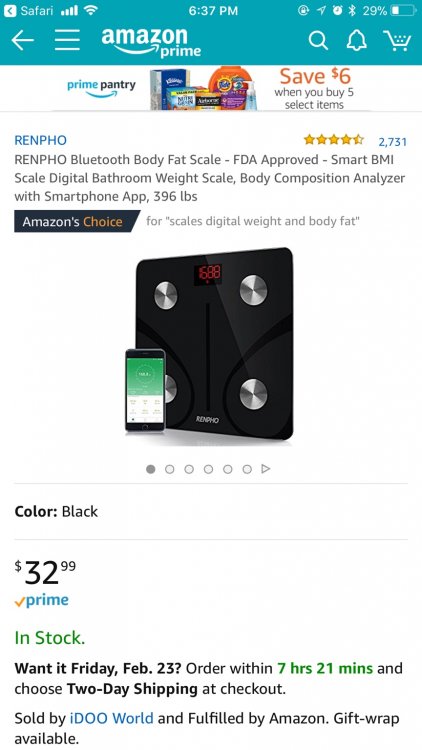
The best weight scale ever

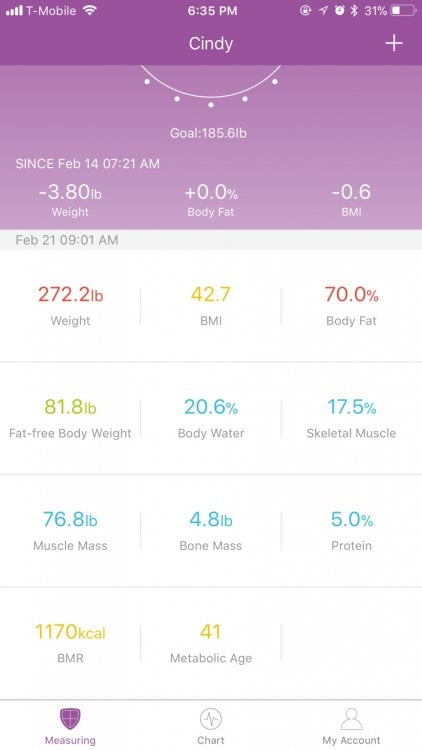
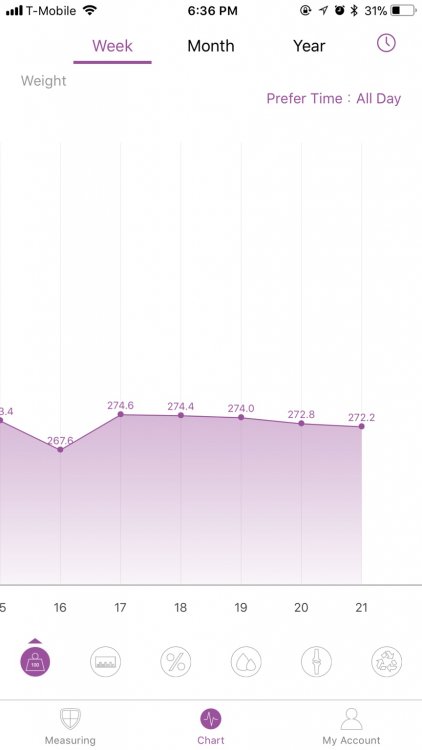
RENPHO Bluetooth Body Fat scale I bought on Amazon my sister idea you buy this scale and it tells you everything you need to know about your body every time you weigh yourself you open app on phone and it records your weight time and date gives you all the details you want to know and keeps trap every time you step on scale I love it so much even tells you how much protien your body entails my protien is pretty low I started at 336 posted an example of app for all of you also you can add friends to it so we can follow each other weight loss IMG_9771.thumb.JPG.9fc4ed2b7fa54a82ae6fed757e2eed51.JPGIMG_9773.thumb.JPG.ae6fdf1000c725553ebd1ab38f6ea3e7.JPGIMG_9774.thumb.JPG.2a5224d6a76d2b3c898da10787a7612d.JPG
  • Replies 2
  • Views 610
  • Created
  • Last Reply

Top Posters In This Topic

Featured Replies

Wow that’s really neat. The price isn’t bad either! Thanks for sharing!


Height 5’6
HW - 275
SW - 265
CW - 209
GW - 150ish

Sleeved 12/14/17
Revision to bypass due to complications 2/13/18

Join the conversation

You can post as a guest; create a free account to track replies, follow topics, and be part of the largest weight loss surgery community.

Join the conversation

You can post now and register later. If you have an account, sign in now to post with your account.

Guest
Reply to this topic...

Account

Navigation

Search

Search

Configure browser push notifications

Chrome (Android)
  1. Tap the lock icon next to the address bar.
  2. Tap Permissions → Notifications.
  3. Adjust your preference.
Chrome (Desktop)
  1. Click the padlock icon in the address bar.
  2. Select Site settings.
  3. Find Notifications and adjust your preference.