Skip to content
View in the app

A better way to browse. Learn more.

BariatricPal

A full-screen app on your home screen with push notifications, badges and more.

To install this app on iOS and iPadOS
  1. Tap the Share icon in Safari
  2. Scroll the menu and tap Add to Home Screen.
  3. Tap Add in the top-right corner.
To install this app on Android
  1. Tap the 3-dot menu (⋮) in the top-right corner of the browser.
  2. Tap Add to Home screen or Install app.
  3. Confirm by tapping Install.
  • Appearance

Join BariatricPal free

  • Ask your own questions
  • Reply and follow topics
  • Message other members
  • No cost, no spam

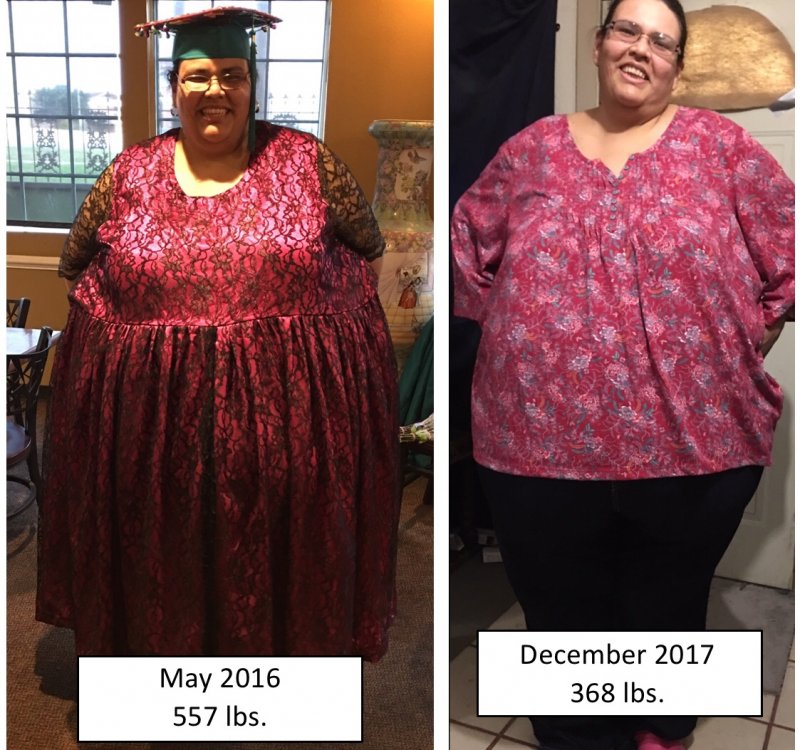
Progress picture! 200 lbs. difference

  • Popular Post

I started my diet and exercise before I started The weight loss surgery process. I was 557 lbs. in May 2016 and I got down to 450 lbs. when I did start my weight loss surgery process in May 2017. I finally had my sleeve on December 5th 2017 and I was 381 lbs. today January 17th 2018 I am down to 355 lbs. so I started off at 557 lbs. and today I am 355 lbs. IMG_9172.JPG
  • Replies 19
  • Views 4.2k
  • Created
  • Last Reply

Top Posters In This Topic

Most Popular Posts

  • KimTriesRNY
    KimTriesRNY

    This is so motivating. It is so easy to get discouraged, I often think of how much farther I have to go instead of how far I have come. Thank you for sharing!

  • sunshinetinks
    sunshinetinks

    OMG! That is incredible! You go girl! Sent from my Nexus 5 using BariatricPal mobile app

Featured Replies

Fantastic! Keep smiling!

On 1/17/2018 at 5:51 PM, Nessa36 said:

started off at 557 lbs. and today I am 355 lbs.

@Nessa36

can't think of a proper word to refer to your weight loss and success.

you've done great so far. the best is yet to come:rolleyes:

keep up the good job

kathy

congrats

Wow!! You look fabulous!! Congrats to you and thank you for inspiring me!

Join the conversation

You can post as a guest; create a free account to track replies, follow topics, and be part of the largest weight loss surgery community.

Join the conversation

You can post now and register later. If you have an account, sign in now to post with your account.

Guest
Reply to this topic...

Account

Navigation

Search

Search

Configure browser push notifications

Chrome (Android)
  1. Tap the lock icon next to the address bar.
  2. Tap Permissions → Notifications.
  3. Adjust your preference.
Chrome (Desktop)
  1. Click the padlock icon in the address bar.
  2. Select Site settings.
  3. Find Notifications and adjust your preference.