Skip to content
View in the app

A better way to browse. Learn more.

BariatricPal

A full-screen app on your home screen with push notifications, badges and more.

To install this app on iOS and iPadOS
  1. Tap the Share icon in Safari
  2. Scroll the menu and tap Add to Home Screen.
  3. Tap Add in the top-right corner.
To install this app on Android
  1. Tap the 3-dot menu (⋮) in the top-right corner of the browser.
  2. Tap Add to Home screen or Install app.
  3. Confirm by tapping Install.

INCHES OR WEIGHT?

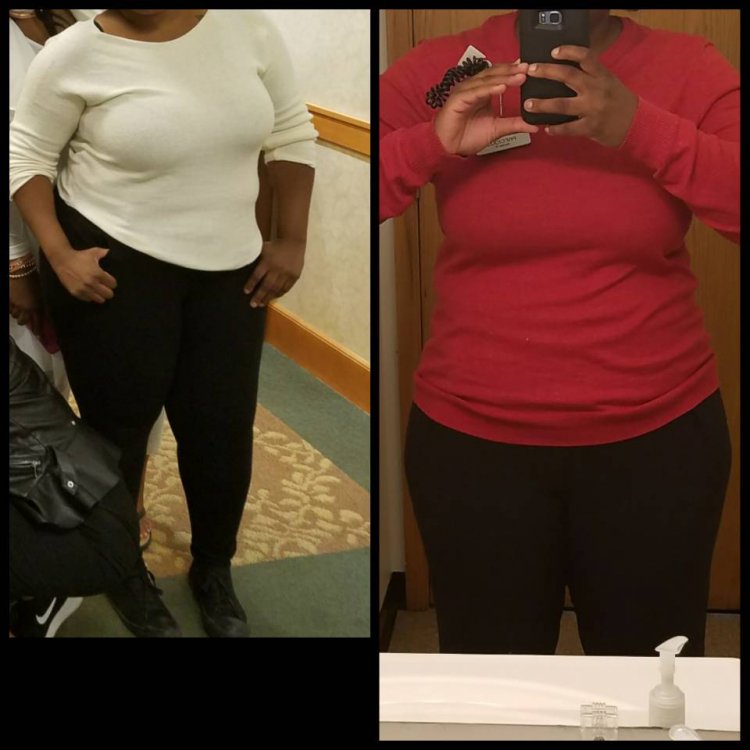
What do you lose first INCHES or WEIGHT? ME personally I lose INCHES quicker than weight... the pic on the left was 9/2/17 and the pic on the right is from today 9/12/17 PhotoGrid_1505257021444.jpg
Sent from my SM-G935V using BariatricPal mobile app

  • Replies 6
  • Views 894
  • Created
  • Last Reply

Featured Replies

I lost weight first but then during stalls inches. I am so glad I measured both, it helped when I hit those stalls to see the other numbers going down.

  • Author

Oh by the way I weigh 252 in both pictures

Sent from my SM-G935V using BariatricPal mobile app

Both at the same time. Then with stalls, during a stall I lose inches. Which is why people should take their measurements every week, or at least once a month. Weight, stall, inches, weight. Rinse and repeat that has been the pattern the whole time. I wouldn't know that if I didn't track. Tracking helps you not panic because you understand what is going on.

I'm 4 months out... I notice my weight loss more than what the scale is saying so while I'm definitely losing weight (about 10lbs a month) I can really see the inches. I recently compared a picture of me a month ago to now and it was only a 6lb difference but my body looks completely different despite "just losing" 6lbs because of the inches I lost.


How long do your stalls last?


Oh by the way I weigh 252 in both pictures

Sent from my SM-G935V using BariatricPal mobile app


Proof that the # on scale isn't the end all, be all because I definitely see a change in the 2nd pic. :)


- No idea what I'm doing but I'm here! :)

Archived

This topic is now archived and is closed to further replies.

Trending Products

PatchAid Vitamin Patches

Account

Navigation

Search

Search

Configure browser push notifications

Chrome (Android)
  1. Tap the lock icon next to the address bar.
  2. Tap Permissions → Notifications.
  3. Adjust your preference.
Chrome (Desktop)
  1. Click the padlock icon in the address bar.
  2. Select Site settings.
  3. Find Notifications and adjust your preference.