Skip to content
View in the app

A better way to browse. Learn more.

BariatricPal

A full-screen app on your home screen with push notifications, badges and more.

To install this app on iOS and iPadOS
  1. Tap the Share icon in Safari
  2. Scroll the menu and tap Add to Home Screen.
  3. Tap Add in the top-right corner.
To install this app on Android
  1. Tap the 3-dot menu (⋮) in the top-right corner of the browser.
  2. Tap Add to Home screen or Install app.
  3. Confirm by tapping Install.

My Journey

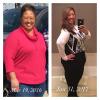
I decided that I had to do something after I realized that I was continuing to have health issues that was attributed to my weight. Without telling anyone, I signed up to begin my journey and started my journey in Feb 2016 to a much healthier and happier life.

My stats were as follows:

HW 325; SW 289; CW 268

57 lbs down in total

21 lbs down since surgery (1.5 months)

I was sleeved on 12/21 and recovery went well. I couldn't have made a better decision.

Sharing my progress with you all...

Wishing everyone a successful journey and stay tuned for more updates.

Sent from my iPhone

post-309498-1486350006629_thumb.jpg

Edited by cfitting

  • Replies 5
  • Views 656
  • Created
  • Last Reply

Featured Replies

You are off to an awesome start! Keep up the good work!!

Great work, keep that positivity and that smile and you will go far!

Sent from my Nexus 6P using the BariatricPal App

Im going in Feb 27th. I backed out the first time 2 years ago. It was a mental road block for me, but I now realize I need to do this before I get sick. How are you feeling since surgery and how difficult is the liquid phase?

  • Author

I'm feeling great JerseyJules! I actually didn't mind the liquid phase. I moved faster than expected through clear liquids, then full liquids, purée, and solids because I wanted to get back to work after 2 weeks knowing what I could and could not tolerate food wise.


Sent from my iPhone

Archived

This topic is now archived and is closed to further replies.

Trending Products

PatchAid Vitamin Patches

Account

Navigation

Search

Search

Configure browser push notifications

Chrome (Android)
  1. Tap the lock icon next to the address bar.
  2. Tap Permissions → Notifications.
  3. Adjust your preference.
Chrome (Desktop)
  1. Click the padlock icon in the address bar.
  2. Select Site settings.
  3. Find Notifications and adjust your preference.