Skip to content
View in the app

A better way to browse. Learn more.

BariatricPal

A full-screen app on your home screen with push notifications, badges and more.

To install this app on iOS and iPadOS
  1. Tap the Share icon in Safari
  2. Scroll the menu and tap Add to Home Screen.
  3. Tap Add in the top-right corner.
To install this app on Android
  1. Tap the 3-dot menu (⋮) in the top-right corner of the browser.
  2. Tap Add to Home screen or Install app.
  3. Confirm by tapping Install.

What a difference 1 week can make!

  • Popular Post

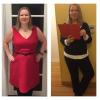
So am traveling this week and noticed my clothes felt looser. I took out my tape measure and it says I've lost 2 inches from my waist in the last 3 days!!! So I took a picture...these pictures are 1 week apart.

Awesome!post-300502-0-03887100-1484184139_thumb.jpg
  • Replies 7
  • Views 1.2k
  • Created
  • Last Reply

Featured Replies

  • Author

Noticeable. Keep moving forward. Congrats. Did you plan ahead of time on where to eat ect?

Sent from my SM-J700T1 using the BariatricPal App

Thanks! Yes and no. I planned breakfast: overnight oats (chia seeds and oats with premier protein) (brought that with me, but picked up the premier when I got here. Did a Walmart run as soon as I landed to pick up the protein and snacks like blueberries and almonds. Then just ate out for meals and took home leftovers for lunch at the office.

So am traveling this week and noticed my clothes felt looser. I took out my tape measure and it says I've lost 2 inches from my waist in the last 3 days!!! So I took a picture...these pictures are 1 week apart.

Awesome!attachicon.gif IMG_1376.JPG

What a change in just a week! That's amazing!

Sent from my iPhone using the BariatricPal App

  • Author

Congrats.... chia seeds? When did you have your surgery?

Sent from my SM-J700P using the BariatricPal App

3months ago

Archived

This topic is now archived and is closed to further replies.

Trending Products

PatchAid Vitamin Patches

Account

Navigation

Search

Search

Configure browser push notifications

Chrome (Android)
  1. Tap the lock icon next to the address bar.
  2. Tap Permissions → Notifications.
  3. Adjust your preference.
Chrome (Desktop)
  1. Click the padlock icon in the address bar.
  2. Select Site settings.
  3. Find Notifications and adjust your preference.