




- Replies 17
- Views 1.6k
- Created
- Last Reply
Top Posters In This Topic
-
Redmaxx 4 posts
-
gustavio 3 posts
-
Vinasu 1 post
-
Treadmillwalker 1 post



Most Popular Posts
-
I also make cheddar cheese chips in the oven but they are kind of a pain in the butt. These are much easier. Also, another delicious treat I made tonight were skinny mozzarella sticks and used marin
-
They're at costco. They're a bit salty, but they are fantastic for adding a bit of crunch to things. Sent from my SM-G925V using the BariatricPal App
-
Central Market makes parmesan crisps daily and they can be found in the cheese area. Very good and not salty. I keep telling myself I will make my own but haven't yet.

Posted Images
Featured Replies
Join the conversation
You can post as a guest; create a free account to track replies, follow topics, and be part of the largest weight loss surgery community.
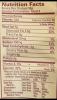
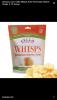
My NUT suggested a snack food that she had recently tried and I have to say, when I get a knack for chips these are fantastic!!! Also, a good source of Protein and no carbs or sugar! By the way, I found mine at Walmart near the imported cheeses.
Sent from my iPhone using the BariatricPal App
Edited by gustavio