Skip to content
View in the app

A better way to browse. Learn more.

BariatricPal

A full-screen app on your home screen with push notifications, badges and more.

To install this app on iOS and iPadOS
  1. Tap the Share icon in Safari
  2. Scroll the menu and tap Add to Home Screen.
  3. Tap Add in the top-right corner.
To install this app on Android
  1. Tap the 3-dot menu (⋮) in the top-right corner of the browser.
  2. Tap Add to Home screen or Install app.
  3. Confirm by tapping Install.
  • Appearance

Join BariatricPal free

  • Ask your own questions
  • Reply and follow topics
  • Message other members
  • No cost, no spam

Reselling clothes

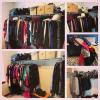
Where do you resell clothes?? I have a LOT to sell and don't want to list each piece individually. post-292413-14753497760591_thumb.jpg

Sent from my iPhone using the BariatricPal App

  • Replies 21
  • Views 3.1k
  • Created
  • Last Reply

Top Posters In This Topic

Most Popular Posts

  • I got about a $1 an item from ThredUp. Most were brand new with tags and they sold every item for a decent amount. I'll never do it again - I'd rather donate.

  • skinny_knees
    skinny_knees

    Find a local consignment shop. Sent from my SM-G930T using the BariatricPal App

  • I'm debating trying poshmark for some of my nicer pieces. Has anyone had luck with them?

Posted Images
Featured Replies

ThreadUp is great - they send you giant bags to fill then you return them and they sort through each item and tell you how much they will pay you for it. You can get a check or credit from them to use towards you buying your next size.

Sent from my iPhone using the BariatricPal App

I got about a $1 an item from ThredUp. Most were brand new with tags and they sold every item for a decent amount. I'll never do it again - I'd rather donate.

I agree. I love buying from them but I wouldn't bother selling to them.

Sent from my iPhone using the BariatricPal App

  • Author

Good to know! Would I have to list each item separately on poshmark or I can just send them it all at once

Sent from my iPhone using the BariatricPal App

Good to know! Would I have to list each item separately on poshmark or I can just send them it all at once

Sent from my iPhone using the BariatricPal App

You can check out the different companies policies to see what works best for you. I will say that the more work and effort you put in, the better reward. If you want to just send a pile of clothes where someone else has to do the work, you won't get as much. Also, If you donate to a local women's shelter for example, you still need to document the number of items and condition to support a tax writeoff.

Honestly it is best to just donate for the tax deduction. It takes the least amount of time and you get the most bang for your buck.

Clothes are so cheap now, there isn't much of a market for re-sell unless you have really nice name brands.

I can resell my dresses from Bebe since I usually just wear them once and that is it. Unless something cost over $80 originally and is a brand that people really want, it won't resell for enough to make it worth selling.

A lot of people in my area post to the facebook groups and just have people come over... kinda like a garage sale. The post a few pics and price ranges and have an open period or make appointments. One woman sold over 100 pieces that way.

It seems like an exchange works well in major area like NYC but even there it is like a limited event. I have not even been able to make my practice's support group. But I would agree unless you make out at garage sale (which via Craigslist might be best bang with less time) probably best to just donate.

Join the conversation

You can post as a guest; create a free account to track replies, follow topics, and be part of the largest weight loss surgery community.

Join the conversation

You can post now and register later. If you have an account, sign in now to post with your account.

Guest
Reply to this topic...

Account

Navigation

Search

Search

Configure browser push notifications

Chrome (Android)
  1. Tap the lock icon next to the address bar.
  2. Tap Permissions → Notifications.
  3. Adjust your preference.
Chrome (Desktop)
  1. Click the padlock icon in the address bar.
  2. Select Site settings.
  3. Find Notifications and adjust your preference.