




genepro vs isopure
- Replies 17
- Views 13.8k
- Created
- Last Reply




Popular Days
Most Popular Posts
-
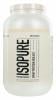
Ok so there are those who swear by GENEPRO and those who like others. The key to any is that you don't go over 140 degrees with Water mixing. I have mixed Isopure with cold water and hot broth. I love
-
I'm using Isopure unflavored. Clumps a little bit in hot Soups. Amazing in sf pudding and shakes. I do a cup of milk, Greek yogurt and Protein in blender. Can't even taste the protein. I also did crea
-
GENEPRO has no taste and mixes well with hot and cold, just make sure the hot isn't too hot. Sent from my SM-N910T using the BariatricPal App


Posted Images
Featured Replies
Join the conversation
You can post as a guest; create a free account to track replies, follow topics, and be part of the largest weight loss surgery community.
Can I get some opinions on genepro vs isopure unflavored protein? Which one seems to mix into stuff the best? After taste? Etc. Just looking for some input before I buy any. Surgery is Thursday. I bought Premier protein and I like those now but have heard taste buds can change after surgery. I want to be prepared. Thank you.[emoji4]