




3 months post op
- Replies 18
- Views 3k
- Created
- Last Reply
Top Posters In This Topic
-
AnaLiza 3 posts
-
miamomma 1 post
-
PRINCESS2218 1 post
-
Hiraeth 1 post




Most Popular Posts
-
I haven't been 196 since I was 18, too! And at age 17, I was only 145. Hard to believe I was 115 at age 14! Oral steroids are evil, lol! Congratulations! You look amazing!
-
You look GREAT!
-
Congrats you are doing great and you look fabulous! We have similar stats. I was sleeved on June 1st and weighed 243. I'm 198.5 today. Yay us!!!
Posted Images

Featured Replies
Join the conversation
You can post as a guest; create a free account to track replies, follow topics, and be part of the largest weight loss surgery community.
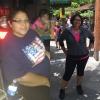
I had my surgery on June 7,2016 day of surgery weight was 235 starting weight was 252, today I'm at 196 and went from a size 20 to a size 13 !! I'm so excited , I have a lot more energy now, I haven't been in this size since I was 18. I still have ways to go to get to my goal weight, but I'm happy with how far I have come. It's been tough, but worth it.

Sent from my iPhone using the BariatricPal App
Edited by AnaLiza