Skip to content
View in the app

A better way to browse. Learn more.

BariatricPal

A full-screen app on your home screen with push notifications, badges and more.

To install this app on iOS and iPadOS
  1. Tap the Share icon in Safari
  2. Scroll the menu and tap Add to Home Screen.
  3. Tap Add in the top-right corner.
To install this app on Android
  1. Tap the 3-dot menu (⋮) in the top-right corner of the browser.
  2. Tap Add to Home screen or Install app.
  3. Confirm by tapping Install.
  • Cart

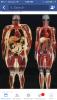
Just a visual reminder

  • Replies 5
  • Views 1.5k
  • Created
  • Last Reply

Featured Replies

@@Julie norton WOW! For some reason, this x-ray of a 250 pound person bothers me more than looking at myself at that weight did! I guess seeing how the organs are enlarged -- even the heart! So glad I'm doing something about this!!

Wow! I need a big poster size of this to hang on my fridge.

Sent from my SM-N900T using the BariatricPal App

  • 2 weeks later...

Wow!!! Very interesting......and thought-provoking. Thanks for sharing!

Archived

This topic is now archived and is closed to further replies.

Trending Products

PatchAid Vitamin Patches

Account

Navigation

Search

Search

Configure browser push notifications

Chrome (Android)
  1. Tap the lock icon next to the address bar.
  2. Tap Permissions → Notifications.
  3. Adjust your preference.
Chrome (Desktop)
  1. Click the padlock icon in the address bar.
  2. Select Site settings.
  3. Find Notifications and adjust your preference.