Skip to content
View in the app

A better way to browse. Learn more.

BariatricPal

A full-screen app on your home screen with push notifications, badges and more.

To install this app on iOS and iPadOS
  1. Tap the Share icon in Safari
  2. Scroll the menu and tap Add to Home Screen.
  3. Tap Add in the top-right corner.
To install this app on Android
  1. Tap the 3-dot menu (⋮) in the top-right corner of the browser.
  2. Tap Add to Home screen or Install app.
  3. Confirm by tapping Install.

Nsv

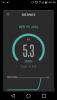
I am so happy went walking today and did 5.3k in one hour without stopping once and didn't run out of breath. Something I would have never done before. Can't wait for the 5k color run. [iMpost-258362-14611113503942_thumb.jpgpost-258362-14611113774355_thumb.jpgpost-258362-14611113938584_thumb.jpgG][/img]
Sent from my LGMS330 using the BariatricPal App

  • Replies 3
  • Views 527
  • Created
  • Last Reply

Featured Replies

Congratulations! Every step counts! I've signed up for my second Color Run in October... I'm still pre-op, and I did the last one, but boy did I hurt afterwards. I'm really hoping I'll be in much better shape by October to do the ones I'm doing which will be Post Op!

Archived

This topic is now archived and is closed to further replies.

Trending Products

PatchAid Vitamin Patches

Account

Navigation

Search

Search

Configure browser push notifications

Chrome (Android)
  1. Tap the lock icon next to the address bar.
  2. Tap Permissions → Notifications.
  3. Adjust your preference.
Chrome (Desktop)
  1. Click the padlock icon in the address bar.
  2. Select Site settings.
  3. Find Notifications and adjust your preference.