




- Replies 9
- Views 946
- Created
- Last Reply
Top Posters In This Topic
-
Elode 2 posts
-
Margie122 1 post
-
wheezysmom 1 post
-
Dub 1 post



Popular Days
Most Popular Posts
-
Awesome NSV! [emoji106]????[emoji5]
-
Such a cool discovery for you. You look great and are reaping the rewards of this wonderful stuff. Huge respect and thank you for being there to inspire and motivate.
-
@@Dub aww thanks bud! I'm still a work in progress but it's been fun! Well you know!
Posted Images

Featured Replies
Join the conversation
You can post as a guest; create a free account to track replies, follow topics, and be part of the largest weight loss surgery community.
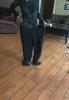
I was cleaning out my closet and found the 3x pair of scrubs I wore the day before surgery. I can fit both legs in one leg!!! So cool! AND I wore my daughters outfit yesterday. This is so much fun! Thank you Jesus for giving me the renewed life I have now. You probably can't tell but those scrubs were tearing at the seam they were so tight. 14 months later and I wear a small. That's all, just thought I'd share. Hope everyone is winning their own battle! Stay strong, it's worth the efforts. I cut my head off the scrub picture because I was looking a hot mess. I was cleaning!