




- Replies 16
- Views 978
- Created
- Last Reply
Top Posters In This Topic
-
MrsKarenC2008 4 posts
-
ProudGrammy 2 posts
-
fernandfj 1 post
-
Pillar2butterfly 1 post


Most Popular Posts
-
That's amazing! Congratulations on all of your victories! For me, NSVs include clothing sizes going down (from 28 in jeans to 24), more energy, and less medication. Had a doctor's appointment on Tues
-
@@MrsKarenC2008 that's wonderful clothes NSV's are the greatest happy dance, happy dance my latest NSV is reading your NSV your pretty smiling face shines through the monitor have to put my s
-
@proudgrammy omgosh ... I blushed reading your reply ! thank you so much for the kind words ... needless to say ... you're right ... I am smiling beams of light ... cant help it ! This feeling

Featured Replies
Join the conversation
You can post as a guest; create a free account to track replies, follow topics, and be part of the largest weight loss surgery community.
Hey everyone ...
I am so very excited about my NSV that I had to share with those who understand it best !
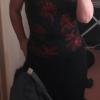
I used to wear a size 4xl shirt ... now I'm in an XL !
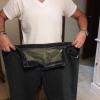
I'm down 6 pant sizes ... and from a 46 to 40 in my bra ! ( oopsy .. sorry guys! )
Had my 3 month check up yesterday ... doc says all is going along according to plan and they are very proud of the progress I've made in such a short time ...
I cannot tell you how over the moon I am !
Anyone else have an amazing NSV to share ?!