Skip to content
View in the app

A better way to browse. Learn more.

BariatricPal

A full-screen app on your home screen with push notifications, badges and more.

To install this app on iOS and iPadOS
  1. Tap the Share icon in Safari
  2. Scroll the menu and tap Add to Home Screen.
  3. Tap Add in the top-right corner.
To install this app on Android
  1. Tap the 3-dot menu (⋮) in the top-right corner of the browser.
  2. Tap Add to Home screen or Install app.
  3. Confirm by tapping Install.
  • Appearance

Join BariatricPal free

  • Ask your own questions
  • Reply and follow topics
  • Message other members
  • No cost, no spam

Problems with photo on this site?

A different photo is showing up on my posts- can't figure out why!

  • Replies 5
  • Views 595
  • Created
  • Last Reply

Top Posters In This Topic

Most Popular Posts

Posted Images

Featured Replies

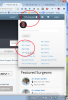
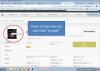
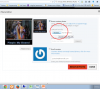
Do you mean your profile photo?

The photos below show how to change your profile avatar.

post-147109-0-37158100-1422231458_thumb.png

post-147109-0-33558400-1422231451_thumb.png

post-147109-0-72756100-1422231445_thumb.png

@@joatsaint

Nice job.

Refresh and/or clear your cache. Sometimes the site lags and the wrong photo shows up temporarily. It's usually a glitch easy fixed with a refresh.

I posted this same complaint in the web assistance subforum back in October. It only does it on the full version on my iPad. My avatar (and many others) change almost daily. The full site also causes Safari to freeze when I'm typing responses. For this reason I started using the iPad app version of BP which sucks because I can't see avatars or tickers or profiles. I check out the full browser version occasionally, but the glitches are still there. Nothing is more frustrating than typing a long post only to have the whole thing freeze up and I have to shut down Safari and I lose the entire post. I also can't cut and paste within BP full version. I've spent hours with Apple tech support and even rebooted my iPad to default factory settings. Since BP is the only site that does this, it's likely a BP issue, not an iPad issue.

  • Author

Thanks all- seems to be an iPad problem.

Join the conversation

You can post as a guest; create a free account to track replies, follow topics, and be part of the largest weight loss surgery community.

Join the conversation

You can post now and register later. If you have an account, sign in now to post with your account.

Guest
Reply to this topic...

Account

Navigation

Search

Search

Configure browser push notifications

Chrome (Android)
  1. Tap the lock icon next to the address bar.
  2. Tap Permissions → Notifications.
  3. Adjust your preference.
Chrome (Desktop)
  1. Click the padlock icon in the address bar.
  2. Select Site settings.
  3. Find Notifications and adjust your preference.