Skip to content
View in the app

A better way to browse. Learn more.

BariatricPal

A full-screen app on your home screen with push notifications, badges and more.

To install this app on iOS and iPadOS
  1. Tap the Share icon in Safari
  2. Scroll the menu and tap Add to Home Screen.
  3. Tap Add in the top-right corner.
To install this app on Android
  1. Tap the 3-dot menu (⋮) in the top-right corner of the browser.
  2. Tap Add to Home screen or Install app.
  3. Confirm by tapping Install.

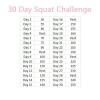
30 Day Squat Challenge

I'm on day 3 in the 30 Day Squat Challenge and I'm feeling it. I'm NOT gonna quit I'm determine to get through these next 27 days. Has anyone done this, if so can you post pics. I'll post mines when I'm done.

post-126813-14153694132425_thumb.jpg

  • Replies 6
  • Views 986
  • Created
  • Last Reply

Featured Replies

No, but I'm in. Do you have to do them all at the same time, or can you split it up? Those are a scary amount of squats, but I know they are good for you!

holy crap - that's a lot of squats!! I did 50 on Monday (my personal trainer made me do it) and I was suffering for the next couple days. I just can't imagine doing more than that, and almost every day... but I'm sure if you can make it through it your buns and thighs will look pretty darn good by the end!

  • Author

No, but I'm in. Do you have to do them all at the same time, or can you split it up? Those are a scary amount of squats, but I know they are good for you!

You can split them up

I'd imagine you could add some variety to those squats to make them more interesting. Plie squats. Step squats. Pulsed squats. Wall squats.

  • Author

Yes ma'am

OMG, I so want to do this! Are you doing just simple squats or are you using weights?

Archived

This topic is now archived and is closed to further replies.

Trending Products

PatchAid Vitamin Patches

Account

Navigation

Search

Search

Configure browser push notifications

Chrome (Android)
  1. Tap the lock icon next to the address bar.
  2. Tap Permissions → Notifications.
  3. Adjust your preference.
Chrome (Desktop)
  1. Click the padlock icon in the address bar.
  2. Select Site settings.
  3. Find Notifications and adjust your preference.