Skip to content
View in the app

A better way to browse. Learn more.

BariatricPal

A full-screen app on your home screen with push notifications, badges and more.

To install this app on iOS and iPadOS
  1. Tap the Share icon in Safari
  2. Scroll the menu and tap Add to Home Screen.
  3. Tap Add in the top-right corner.
To install this app on Android
  1. Tap the 3-dot menu (⋮) in the top-right corner of the browser.
  2. Tap Add to Home screen or Install app.
  3. Confirm by tapping Install.
  • Cart

Aging Backwards

  • Popular Post

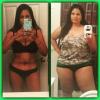
Before my surgery I felt in my late 50's...looked it too. I feel like I'm getting younger approaching my late 30's...haha! Getting the comments how much younger I look helps too. I'm glad I did this surgery...good times!

  • Replies 10
  • Views 1.6k
  • Created
  • Last Reply

Featured Replies

Congrats!!! That is awesome!

I love it! I've been experiencing a similar thing. Congrats!

God I can't wait! Maybe I'll even dress younger ???? Nov 6 you cannot come soon enough!

Edited by happymama2014

God I can't wait! Maybe I'll even dress younger ???? Nov 6 you cannot come soon enough!

I'm November 6 too!!!

I looked like someone's middle aged aunt. Ugh, so glad I did it.

I'm READY to age backwards!

I'm November 6 too!!!

Awesome! What area are u in? I've tried to create a November group but I can't seem to figure out how:(

  • Author

Thanks! It is awesome. :)

  • 11 months later...
  • 1 month later...

@camerolegend I get exactly what you mean.

I'm feeling younger already. It's on the beginning stages....but there is a marked improvement.

congrats!! and i love the screen name! :) I'm cammie girl too :D 11232172_10206672152299739_5902937596796

Very sweet ride !!!!!

Archived

This topic is now archived and is closed to further replies.

Trending Products

PatchAid Vitamin Patches

Account

Navigation

Search

Search

Configure browser push notifications

Chrome (Android)
  1. Tap the lock icon next to the address bar.
  2. Tap Permissions → Notifications.
  3. Adjust your preference.
Chrome (Desktop)
  1. Click the padlock icon in the address bar.
  2. Select Site settings.
  3. Find Notifications and adjust your preference.