




Introduction from a Cali cutie!
- Replies 2
- Views 605
- Created
- Last Reply
Top Posters In This Topic
-
keish_lorraine 1 post
-
msfitn2014 1 post

Popular Days
Posted Images
Featured Replies
Join the conversation
You can post as a guest; create a free account to track replies, follow topics, and be part of the largest weight loss surgery community.
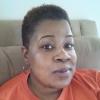
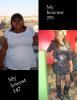
I wanted to introduce myself. My name is Cherice, I was born, raised and currently live in Los Angeles. June 99 at 255 I was banded. Lost 60lbs that summer. I stayed there for a while, then all of a sudden I started to lose again and ended up 147!bs. My band slipped and had to be removed in Jan 12, my surgeon performed the sleeve at that time. Since then I have gained and am now back to 194. I do not have the restriction the band provided, have been making horrible food choices and no exercise. Life has kicked my butt, my daughters father passed and the love of my life dumped me all these in a span of three months. However I want to re submerge myself back into the wls life. I'm here to rediscover my motivation, find inspiration and also share my journey. Thank you for reading this and I hope to interact with you all more!