Skip to content
View in the app

A better way to browse. Learn more.

BariatricPal

A full-screen app on your home screen with push notifications, badges and more.
To install this app on iOS and iPadOS
  1. Tap the Share icon in Safari
  2. Scroll the menu and tap Add to Home Screen.
  3. Tap Add in the top-right corner.
To install this app on Android
  1. Tap the 3-dot menu (⋮) in the top-right corner of the browser.
  2. Tap Add to Home screen or Install app.
  3. Confirm by tapping Install.

Last Pre-Op!

I had my last pre-op appointment tonight.

Saw the surgeon went over everything. Answered questions. Calmed my nerves.

Got weighted. Lost 1.5 lbs since last one

Got my Protein shakes and Protein Bars

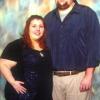
Took my pre surgery picture.

Saw the anastegiologist (sp. should learn how to spell that )

Meet with the nurses.

And lastly I got my for sure date.

Have to be at the hospital at 5:30 am Tuesday August 21

Ahhhhhhhhhh

  • Replies 16
  • Views 1.1k
  • Created
  • Last Reply

Top Posters In This Topic

Featured Replies

Maybe I'm missing something or maybe my Dr office is VERY cautious about giving dates out...my consultation with the surgeon happens two weeks after his seminar...they went ahead and gave me scripts for the GI, chest X-ray, and EKG...there has been ZERO talk of a surgery date...thoughts?

Join the conversation

You can post now and register later. If you have an account, sign in now to post with your account.

Guest
Reply to this topic...

Trending Products

PatchAid Vitamin Patches

Account

Navigation

Search

Search

Configure browser push notifications

Chrome (Android)
  1. Tap the lock icon next to the address bar.
  2. Tap Permissions → Notifications.
  3. Adjust your preference.
Chrome (Desktop)
  1. Click the padlock icon in the address bar.
  2. Select Site settings.
  3. Find Notifications and adjust your preference.