Skip to content
View in the app

A better way to browse. Learn more.

BariatricPal

A full-screen app on your home screen with push notifications, badges and more.

To install this app on iOS and iPadOS
  1. Tap the Share icon in Safari
  2. Scroll the menu and tap Add to Home Screen.
  3. Tap Add in the top-right corner.
To install this app on Android
  1. Tap the 3-dot menu (⋮) in the top-right corner of the browser.
  2. Tap Add to Home screen or Install app.
  3. Confirm by tapping Install.

my first year..

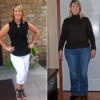
I'll be hitting the one year mark in a couple weeks.. I'm trying to get to the 200lb down mark, it's going to be close.. its been a journey but well worth it. Life is s much different then I expected, simple things like wearing a seat belt, fitting in a booth at the restaurant wearing "normal" clothes just to name a few.. it was hard at times but the good sure out weighs the hard and bad times. keep up the great work and good luck on your journeys.. I'm here to answer any questions I can or help in any way Frank B)

  • Replies 5
  • Views 1.1k
  • Created
  • Last Reply

Featured Replies

Congrats on a succesful 1st year!

Way to go!

Wow, 191 lbs GONE! Congratulations!

Way to go! Your progress is inspiring! And you are also my first "friend" on VST! All the best...

I'll be hitting the one year mark in a couple weeks.. I'm trying to get to the 200lb down mark' date=' it's going to be close.. its been a journey but well worth it. Life is s much different then I expected, simple things like wearing a seat belt, fitting in a booth at the restaurant wearing "normal" clothes just to name a few.. it was hard at times but the good sure out weighs the hard and bad times. keep up the great work and good luck on your journeys.. I'm here to answer any questions I can or help in any way Frank B)[/quote']

Any before and after pics?

Archived

This topic is now archived and is closed to further replies.

Trending Products

PatchAid Vitamin Patches

Account

Navigation

Search

Search

Configure browser push notifications

Chrome (Android)
  1. Tap the lock icon next to the address bar.
  2. Tap Permissions → Notifications.
  3. Adjust your preference.
Chrome (Desktop)
  1. Click the padlock icon in the address bar.
  2. Select Site settings.
  3. Find Notifications and adjust your preference.