Skip to content
View in the app

A better way to browse. Learn more.

BariatricPal

A full-screen app on your home screen with push notifications, badges and more.

To install this app on iOS and iPadOS
  1. Tap the Share icon in Safari
  2. Scroll the menu and tap Add to Home Screen.
  3. Tap Add in the top-right corner.
To install this app on Android
  1. Tap the 3-dot menu (⋮) in the top-right corner of the browser.
  2. Tap Add to Home screen or Install app.
  3. Confirm by tapping Install.

vlines

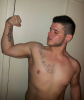
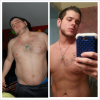
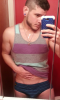
My upcoming vlines down to 195 from 300 since sine feb 4th

post-34949-13813665822847_thumb.png

  • Replies 13
  • Views 1.5k
  • Created
  • Last Reply

Featured Replies

Looking good!! You need to update your ticker ,,its confusing . You sure did lose alot of weight quickly over 100 pounds since february.WOW!!!!! You should post some before pics as well. :)

  • Author
Looking good!! You need to update your ticker ' date=',its confusing . You sure did lose alot of weight quickly over 100 pounds since february.WOW!!!!! You should post some before pics as well. :)[/quote']

post-34949-13813665824593_thumb.png

post-34949-1381366582523_thumb.png

You look great !!

Wow! Great job!

THANKS FOR PIX !!!!!!! KEEP UP THE GREAT WORK... YOU SHOULD BE VERY PROUD OF YOURSELF .AWESOME JOB. :D

Nice transformation ..

Holy hell how did you manage that? Feb of 2013?!?!

  • Author
Holy hell how did you manage that? Feb of 2013?!?!

I've been working out like insane lol running and crunches like crazy plus eating nothing but veg and Protein

You look great! And it's amazing that you've lost so much in such a short period of time

  • Author

Today

post-34949-13813665868182_thumb.png

Archived

This topic is now archived and is closed to further replies.

Trending Products

PatchAid Vitamin Patches

Account

Navigation

Search

Search

Configure browser push notifications

Chrome (Android)
  1. Tap the lock icon next to the address bar.
  2. Tap Permissions → Notifications.
  3. Adjust your preference.
Chrome (Desktop)
  1. Click the padlock icon in the address bar.
  2. Select Site settings.
  3. Find Notifications and adjust your preference.