Skip to content
View in the app

A better way to browse. Learn more.

BariatricPal

A full-screen app on your home screen with push notifications, badges and more.

To install this app on iOS and iPadOS
  1. Tap the Share icon in Safari
  2. Scroll the menu and tap Add to Home Screen.
  3. Tap Add in the top-right corner.
To install this app on Android
  1. Tap the 3-dot menu (⋮) in the top-right corner of the browser.
  2. Tap Add to Home screen or Install app.
  3. Confirm by tapping Install.

Progress Pics - Down 62lbs

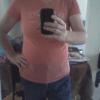
Thrilled with my VSG progress! I need to start working a little harder (maximizing protein intake, vitamins and exercise) but I am getting there faster than I ever thought I would. Prior to surgery October 2, 2012, I was wearing size 30/32 shirts, 28 pants now 18/20 shirts and 22 pants. Still a long way to go but I am feeling better than ever!

VSG Progress for VSTalk.jpg.bmp

  • Replies 7
  • Views 960
  • Created
  • Last Reply

Featured Replies

I can really see a big difference, and it's cool that you're wearing the same or similar clothes so you can really see. I don't really have any good full body shots of me "before". How are you feeling? My surgery was 9/14, so we're only a couple weeks apart. I'm feeling pretty good. It is hard to get that protein in and remember all of the vitamins, though. :)

Wowza! Looking good!

Looking good! Keep it up you'll be skinny in no time!

Sent from my iPhone using VST

Thrilled with my VSG progress! I need to start working a little harder (maximizing Protein intake' date=' Vitamins and exercise) but I am getting there faster than I ever thought I would. Prior to surgery October 2, 2012, I was wearing size 30/32 shirts, 28 pants now 18/20 shirts and 22 pants. Still a long way to go but I am feeling better than ever![/quote']

Amazing!

Great job. Keep it up.

Archived

This topic is now archived and is closed to further replies.

Trending Products

PatchAid Vitamin Patches

Account

Navigation

Search

Search

Configure browser push notifications

Chrome (Android)
  1. Tap the lock icon next to the address bar.
  2. Tap Permissions → Notifications.
  3. Adjust your preference.
Chrome (Desktop)
  1. Click the padlock icon in the address bar.
  2. Select Site settings.
  3. Find Notifications and adjust your preference.