Skip to content
View in the app

A better way to browse. Learn more.

BariatricPal

A full-screen app on your home screen with push notifications, badges and more.

To install this app on iOS and iPadOS
  1. Tap the Share icon in Safari
  2. Scroll the menu and tap Add to Home Screen.
  3. Tap Add in the top-right corner.
To install this app on Android
  1. Tap the 3-dot menu (⋮) in the top-right corner of the browser.
  2. Tap Add to Home screen or Install app.
  3. Confirm by tapping Install.
  • Appearance

Join BariatricPal free

  • Ask your own questions
  • Reply and follow topics
  • Message other members
  • No cost, no spam

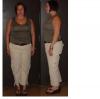
Pics at 6 months -62lbs

Vera made me do it...so here are some pics my co-worker took tonight...why do I still look so wide? EESH!

post-203875-13813131239806_thumb.jpg

  • Replies 14
  • Views 1.5k
  • Created
  • Last Reply

Top Posters In This Topic

Posted Images

Featured Replies

Jennye

You look great! I'm sure if you compared those to some pre-op pics you wouldn't think you looked wide at all! You're doing a great job!

Looking Great Jennye! You are really making great progress.

Congratulations and thanks so much for sharing your pics.

DANG Girl... Whos lookin at U. FAB back at cha.

Congrats !!! Thats 10 lbs avrg per mo. WOW

Your going to pass me right up.:D

You don't look wide... you look awesome... you had better be proud of yourself girl! Did I mention that I really lika dem

britches?????? Looking prettttttyyyy loose...... :D

Wow!You look FAN-TAS-TIC!!:D

Not wide at all,you don't look pleased to be having your pic taken but holy cow you look awesome!!

I love your haircut too!

C

Jennye you look beautiful. I like the no glasses look.

ALEX! You are but a babe yourself. Jennye and you both have "young" arms.

Carolyn

Join the conversation

You can post as a guest; create a free account to track replies, follow topics, and be part of the largest weight loss surgery community.

Join the conversation

You can post now and register later. If you have an account, sign in now to post with your account.

Guest
Reply to this topic...

Account

Navigation

Search

Search

Configure browser push notifications

Chrome (Android)
  1. Tap the lock icon next to the address bar.
  2. Tap Permissions → Notifications.
  3. Adjust your preference.
Chrome (Desktop)
  1. Click the padlock icon in the address bar.
  2. Select Site settings.
  3. Find Notifications and adjust your preference.