Skip to content
View in the app

A better way to browse. Learn more.

BariatricPal

A full-screen app on your home screen with push notifications, badges and more.

To install this app on iOS and iPadOS
  1. Tap the Share icon in Safari
  2. Scroll the menu and tap Add to Home Screen.
  3. Tap Add in the top-right corner.
To install this app on Android
  1. Tap the 3-dot menu (⋮) in the top-right corner of the browser.
  2. Tap Add to Home screen or Install app.
  3. Confirm by tapping Install.

Before/After

I havent been doing so well lately. I discovered things that I heard would hurt my stomach, actually dont and have been having them more than I should. (Beer & candy)

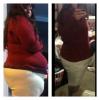
So Im posting a pic to remind myself how far Ive come and also to share with you all. =)

1st pic was a day before surgery, 2nd was June 5th. (less than 4 months out) in the same outfit .

post-2846-13813657074747_thumb.jpg

  • Replies 19
  • Views 2.5k
  • Created
  • Last Reply

Top Posters In This Topic

Posted Images

Featured Replies

Such a huge difference!!! You are doing awesome even if you have weak moments. You are human and just because you had VSG surgery doesn't make you super human! We all want to be "normal" again we just have to choose when to splurge and when not to. I agree with MeMeMeee save it for special occasions! Good luck and congrats on your progress this far! :)

Amazing Transformation!! I am so happy for you! Don't let those nasty cravings run your life. You are in charge. You decide when , if and how much to eat or drink. You and your sleeve are partners to reach your goal of health and happiness. Have a beer...once in a while and enjoy it to the max! Once in a while!

Living the dream!,

Laura

  • Author

Thank you all so much. It's nice to hear such great things. I still see the girl in the first picture when I look in the mirror. But the pictures speak for themselves. Im going to post more!

Join the conversation

You can post now and register later. If you have an account, sign in now to post with your account.

Guest
Reply to this topic...

Trending Products

PatchAid Vitamin Patches

Account

Navigation

Search

Search

Configure browser push notifications

Chrome (Android)
  1. Tap the lock icon next to the address bar.
  2. Tap Permissions → Notifications.
  3. Adjust your preference.
Chrome (Desktop)
  1. Click the padlock icon in the address bar.
  2. Select Site settings.
  3. Find Notifications and adjust your preference.