Skip to content
View in the app

A better way to browse. Learn more.

BariatricPal

A full-screen app on your home screen with push notifications, badges and more.

To install this app on iOS and iPadOS
  1. Tap the Share icon in Safari
  2. Scroll the menu and tap Add to Home Screen.
  3. Tap Add in the top-right corner.
To install this app on Android
  1. Tap the 3-dot menu (⋮) in the top-right corner of the browser.
  2. Tap Add to Home screen or Install app.
  3. Confirm by tapping Install.

PICTURES!!

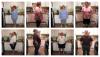
WOW!! I didn't really feel any different until I compared the pics. My husband and I had our surgeries on Jan. 20--3 weeks ago--here's the difference already! He's down 28 and I'm down 24. Make sure you take photos b/c when you think it's not working, you can see it is.

post-4197-13813656262446_thumb.jpg

  • Replies 2
  • Views 764
  • Created
  • Last Reply

Top Posters In This Topic

Posted Images

Featured Replies

Wow yes!! I see major differences. Congrats so far - you both are already doing so well. :)

It is amazing what even 25 pounds can do. I am right with you, I had surgery on 021/17 and am down about 25 pounds. My pants are already getting too big and I just have a ton more energy. I can't wait to see what 50 and 75 are going to feel like.

Join the conversation

You can post now and register later. If you have an account, sign in now to post with your account.

Guest
Reply to this topic...

Trending Products

PatchAid Vitamin Patches

Account

Navigation

Search

Search

Configure browser push notifications

Chrome (Android)
  1. Tap the lock icon next to the address bar.
  2. Tap Permissions → Notifications.
  3. Adjust your preference.
Chrome (Desktop)
  1. Click the padlock icon in the address bar.
  2. Select Site settings.
  3. Find Notifications and adjust your preference.