Skip to content
View in the app

A better way to browse. Learn more.

BariatricPal

A full-screen app on your home screen with push notifications, badges and more.

To install this app on iOS and iPadOS
  1. Tap the Share icon in Safari
  2. Scroll the menu and tap Add to Home Screen.
  3. Tap Add in the top-right corner.
To install this app on Android
  1. Tap the 3-dot menu (⋮) in the top-right corner of the browser.
  2. Tap Add to Home screen or Install app.
  3. Confirm by tapping Install.

Again????????

  • Replies 7
  • Views 1k
  • Created
  • Last Reply

Featured Replies

TGIF, I am so glad, it has been a long week and I am so ready for the weekend. But, I have to work the first aide station at Fall for Greenville this weekend and there is going to be so many food booths and so many of my favorites, Fried Green Tomatos, Shrimp and Grits, Beer, Wine, Fresh kettle Corn, Pulled pork and Chili. I think I better sew my mouth shut before i go downtown or maybe wear some really tight jeans so that if I eat it will hurt. I used to love this event but now I dread it. sigh!

post-208094-13813134388585_thumb.jpg

[ATTACH]24867[/ATTACH]

Weekend warning!!!!!!

post-339289-13813140415213_thumb.jpeg

post-339289-13813140415213_thumb.jpeg

[ATTACH]24867[/ATTACH]

Weekend warning!!!!!!

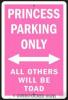
CUTE! But I wonder if anyone noticed "toad" instead of "towed?" :P

Archived

This topic is now archived and is closed to further replies.

Trending Products

PatchAid Vitamin Patches

Account

Navigation

Search

Search

Configure browser push notifications

Chrome (Android)
  1. Tap the lock icon next to the address bar.
  2. Tap Permissions → Notifications.
  3. Adjust your preference.
Chrome (Desktop)
  1. Click the padlock icon in the address bar.
  2. Select Site settings.
  3. Find Notifications and adjust your preference.