Skip to content
View in the app

A better way to browse. Learn more.

BariatricPal

A full-screen app on your home screen with push notifications, badges and more.

To install this app on iOS and iPadOS
  1. Tap the Share icon in Safari
  2. Scroll the menu and tap Add to Home Screen.
  3. Tap Add in the top-right corner.
To install this app on Android
  1. Tap the 3-dot menu (⋮) in the top-right corner of the browser.
  2. Tap Add to Home screen or Install app.
  3. Confirm by tapping Install.

"one"derland!

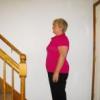
I have officially reached Onederland! I had actually reached it about a week ago but I wanted to make sure the scale wasn't being crazy! I am so excited. Onederland was my one official main goal. Now I have to find a new one to work on.

On another note, after my 2nd fill I have learned that bread and rice are no longer my friends. AT ALL! They have decided to cut ties, and they aren't playing around! So my love for bread and rice has taken a turn, and now it's on to finding new food favorites!

  • Replies 4
  • Views 447
  • Created
  • Last Reply

Top Posters In This Topic

Featured Replies

That is so so exciting Manda!!! Sssooooo proud of you!! Congrats!!

Great Manda I'm so happy for you!!!!! keep up the great work.

  • Awesome job So proud of you
  • I may also have to defriend bread after my 3rd fill I got stuck real bad for the first time not pleasant at all

Omg, congrats Manda!!

Join the conversation

You can post now and register later. If you have an account, sign in now to post with your account.

Guest
Reply to this topic...

Trending Products

PatchAid Vitamin Patches

Account

Navigation

Search

Search

Configure browser push notifications

Chrome (Android)
  1. Tap the lock icon next to the address bar.
  2. Tap Permissions → Notifications.
  3. Adjust your preference.
Chrome (Desktop)
  1. Click the padlock icon in the address bar.
  2. Select Site settings.
  3. Find Notifications and adjust your preference.