
Princessjenrn
Gastric Bypass Patients
-
Joined
-
Last visited
-
-
Major problem for me too Egd/ colonoscopy all good Dr put me on miralax twice a day everyday for life
-
-
-
-
-
This is awesome information !
-
-
Both of these groups are really good no nonsense groups https://www.facebook.com/groups/269474063760393/?ref=share
-
-
-
https://www.facebook.com/groups/456141941588496/?ref=share
-
This one

-
ValerieZ do you know where the problem is ? I use baritastic app for tracking and recipes No sodas no bread
-
Lots of fresh salads with mixed lettuce broccoli cauliflower bell peppers Boiled eggs or grilled chicken no dressings
-
-
I use baritastic food app No sodas no breads
-
-
-
Over the past 5 years I’ve steadily gained 40 pounds. The last 3 months I’ve gone back to basics and following the rules and abandoning the bad habits I’d developed. question is how fast should I expect the weight to come back off? I’m down 15 pounds in 3 months. Stalling last 3 weeks calories 800carb50 net carb 30 exercise 15-20 min a day?
-
-
-
-
Unsure what you mean by too much protein ?? I didn’t think there was such a thing my goal is between 65-80 ? Thoughts ?
-
-
I have 40 pounds of regain to lose that I’ve gained over the last 4-5 years ..... question is I’m going back to the basics of measuring everything journaling cal 800 carbs 50 sugar 25 anyone have problems with getting the regain back off ???
-
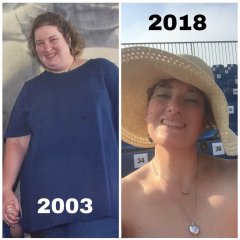
Before n after
-
-
-
Photos to keep me on goal !
-
-
Is there a reason why your keeping your calories above 1000 ? I’d be concerned unless your burning it off with exercise ... just because you can eat that much doesn’t mean you should... I’m not saying this in a negative way... but it could catch up with you....you don’t want to stretch your baby... you’ve been they too much !
-
-
1/2 cup servings it makes 4 servings




.png "Care")