stacy71
Pre Op
-
Joined
-
Last visited
-
-
-
I’m 4 day’s post op, yesterday when at the office having my drain removed the nurse made a note to tell me I may have sharp pains in my left side if I haven’t already. It’s due to the surgeon having tied down part of the stitches in the RNY. I can’t remember the exact wording.
-
 stacy71 reacted to a post in a topic:
Why is it that we can no longer for the rest of our lives drink carbonated drinks or carbonated water like Perrier?
stacy71 reacted to a post in a topic:
Why is it that we can no longer for the rest of our lives drink carbonated drinks or carbonated water like Perrier?
-
-
-
-
-
-
I had RNY surgery Monday and today is Friday... & finally moved some of that dreaded gas!!!! Had an appointment at the Dr’s office yesterday with the 3 other patients that had surgery Monday, I was the only gastric bypass, they were all sleeved, I was the worst for wear. But only 2 pain pills since out of the hospital. Drain was taken out yesterday also and everything is better being home!!! Drinking my shakes and waters is going slow but it is going much better every day! Next Friday is the next appointment with my surgeon and will start soft foods. On the road to a better life
-
-
-
-
I was originally wanted the sleeve but per the doctor the RNY/gastric bypass was better choice for me because I suffer from severe reflux/GERD. My Doctor personally stated the gastric bypass is reversible.
-
-
-
My surgery is tomorrow morning... I already know I will receive the nausea patch behind my ear (forgot the name). I also will have self administered iv pain meds after surgery (of course within time constraints). I’m not nervous or concerned about the surgery itself. I’m just wondering how the tool and everything is going to work and effect me afterward.
-
My surgery is tomorrow and I’ve only lost approximately 10lbs on the 2 week liquid diet. so I don’t know if if it’s me, my body type or what but I hope everything works out ok too!!!
-
I’m glad you’re home and they gave you meds! In my pre op anesthesia advised I will have a nausea patch put behind my ear that should work for approximately 3 day’s. I’m hoping that will help.
-
I love this ... maybe not the 3am-8pm But it’s basically the same regime per my doctor’s office too! Great tips?
-
Oh no!! Take it easy! I hope it gets better in the day’s to come!!
-
Hey there! I also started my liquid diet today for my gastric bypass surgery on the 16Jul. It went pretty well today, only felt hungry once. I previously considered the sleeve but due to issues with GERD for many years I was advised RNY was the much better option.
-
-
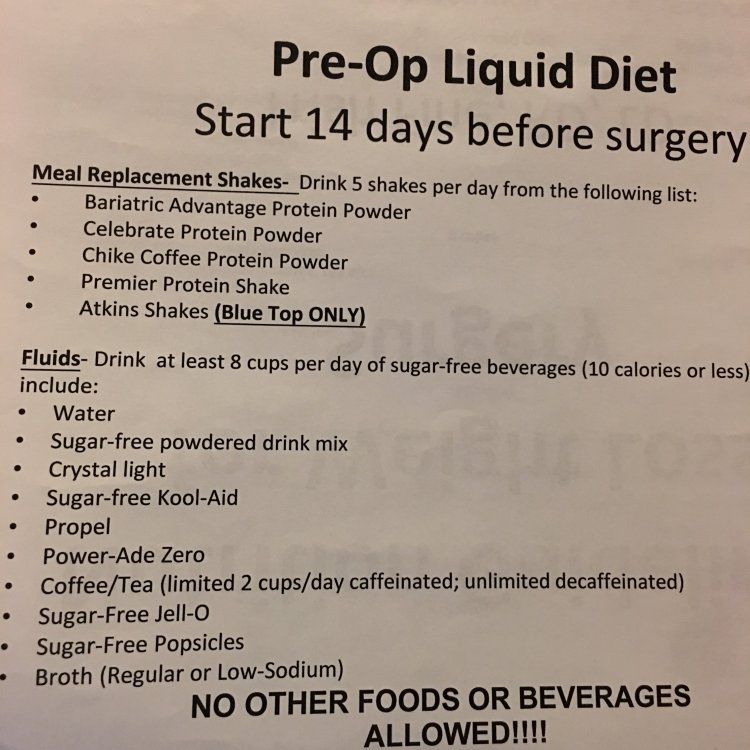
I don’t have to start the pre-op until 2 weeks out meaning the 2Jul, but... it’s a liquid diet. Which our doctor’s and dietitian’s have as: (see insert) 5 protein shakes a day, 8 cups of sugar free drinks/water (10 calories or less), unlimited sugar free popsicles, sugar free jello and broth. we are not allowed pudding or creamy soups in the pre or post op diets.?
-
Same day for me also! Just received my insurance approval yesterday... UHC only took 7 day’s. 3 day countdown until my liquid diet starts.
-
-
-
Exactly!!!!! You never can tell, just like any surgery in general I guess- it’s all taking a chance ?
-
-
Sounds good... I’m trying to prepare myself for what may happen. I don’t know what everyone is going through and trying to read up! Thanks
-
-
I hope I don’t feel hunger like this after sleeve surgery - Because I have that trouble now after a big meal, hunger pains after 30mins!!! ? I haven’t had the surgery yet, 4 more months of doctor monitored diet.... but I know my doctor has repeatedly stated in discussion’s that carbohydrates are to be a thing of the past as of now and to focus mostly on protein. Low to no sugar. And gave us a list of pre approved vitamins, shakes, powders, drinks we could have before and after surgery. And also said when in doubt please ask at the center for adjustments off the listed items. We have pre op and post op list.
-
-
-
Thank you ? I needed that!