sleeveisa
Pre Op
-
Joined
-
Last visited
Everything posted by sleeveisa
-
It's ashame that we have explain ourselves. Sent from my SAMSUNG-SM-N920A using the BariatricPal App
-
Good luck, please keep us posted. My journey starts Dec 7. I'm sure that everyone is waiting for their surgery and would love to read your update after your surgery. We are all here to support each other. You got this! Sent from my SAMSUNG-SM-N920A using the BariatricPal App
-
Amen to all! We are all believers , We are strong We will survive We are going to succeed in our new journey in our lives. God Bless???? Sent from my SAMSUNG-SM-N920A using the BariatricPal App
-
Amazing Sent from my SAMSUNG-SM-N920A using the BariatricPal App God Bless you. Sent from my SAMSUNG-SM-N920A using the BariatricPal App
-
Thx for sharing! Sent from my SAMSUNG-SM-N920A using the BariatricPal App
-
You are welcome. I can't wait to work on my own meals with some of the book suggestions. I'm sure you can also find yourself making your own recipes. Good luck Sent from my SAMSUNG-SM-N920A using the BariatricPal App
-
Congratulations everyone
-
Good luck everyone, have a speedy recovery. You all worked hard to get this point. ???????????????????? Sent from my SAMSUNG-SM-N920A using the BariatricPal App
-
We are ready for the new us. Sent from my SAMSUNG-SM-N920A using the BariatricPal App

-
Keep up the good work Sent from my SAMSUNG-SM-N920A using the BariatricPal App
-
Thank you for sharing, my surgery date is Dec 7. Please update with your recovery. Praying for a speedy recovery. Sent from my SAMSUNG-SM-N920A using the BariatricPal App
-
Good feedback Sent from my SAMSUNG-SM-N920A using the BariatricPal App
-
Yup, can't wait. A new me and a new year. Sent from my SAMSUNG-SM-N920A using the BariatricPal App
-
Good luck Nov sleeve patients. Keep us posted. My journey starts Dec 7. Sent from my SAMSUNG-SM-N920A using the BariatricPal App
-
Good luck, keep us posted Sent from my SAMSUNG-SM-N920A using the BariatricPal App
-
This is a great challenge but my surgery is on Dec 7. Let's try one for Xmas. Sent from my SAMSUNG-SM-N920A using the BariatricPal App
-
You are in good hands in the OR, I also have sle r p apnea and my anesthesiologist told me that I should be fine. Go in with a postive mind and prayers you will be fine. Your OR staff and Dr will be u our strength. Sent from my SAMSUNG-SM-N920A using the BariatricPal App
-
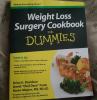
To prepare myself I purchased this book. Sent from my SAMSUNG-SM-N920A using the BariatricPal App
-
My response to who ever ask you why I r not eating enough. I ate earliar and not that hungry and that's it. If at work people will always talk. They r jealous. Keep your chin up. You got this and you are worth it. Sent from my SAMSUNG-SM-N920A using the BariatricPal App
-
My 1st surgery was denied last month, then appealed and within 2 weeks it got approved.n My new date is Dec 7. Can't wait. Good luck Sent from my SAMSUNG-SM-N920A using the BariatricPal App
-
Yes you do. We will have a good beginning Sent from my SAMSUNG-SM-N920A using the BariatricPal App
-
I've been on prosteq for my depression for several years, I pray that after my surgery next month I could stop them. Sent from my SAMSUNG-SM-N920A using the BariatricPal App
-
Congratulations Sent from my SAMSUNG-SM-N920A using the BariatricPal App
-
Best of luck to everyone. We got this. Sent from my SAMSUNG-SM-N920A using the BariatricPal App
-
Dec 7, good luck Sent from my SAMSUNG-SM-N920A using the BariatricPal App Good luck Sent from my SAMSUNG-SM-N920A using the BariatricPal App Good luck Sent from my SAMSUNG-SM-N920A using the BariatricPal App Good luck Sent from my SAMSUNG-SM-N920A using the BariatricPal App Good luck Sent from my SAMSUNG-SM-N920A using the BariatricPal App Sent from my SAMSUNG-SM-N920A using the BariatricPal App Good luck Sent from my SAMSUNG-SM-N920A using the BariatricPal App Good luck Sent from my SAMSUNG-SM-N920A using the BariatricPal App Good luck Sent from my SAMSUNG-SM-N920A using the BariatricPal App Good luck Sent from my SAMSUNG-SM-N920A using the BariatricPal App