jpt.30175
Pre Op
-
Joined
-
Last visited
Everything posted by jpt.30175
-
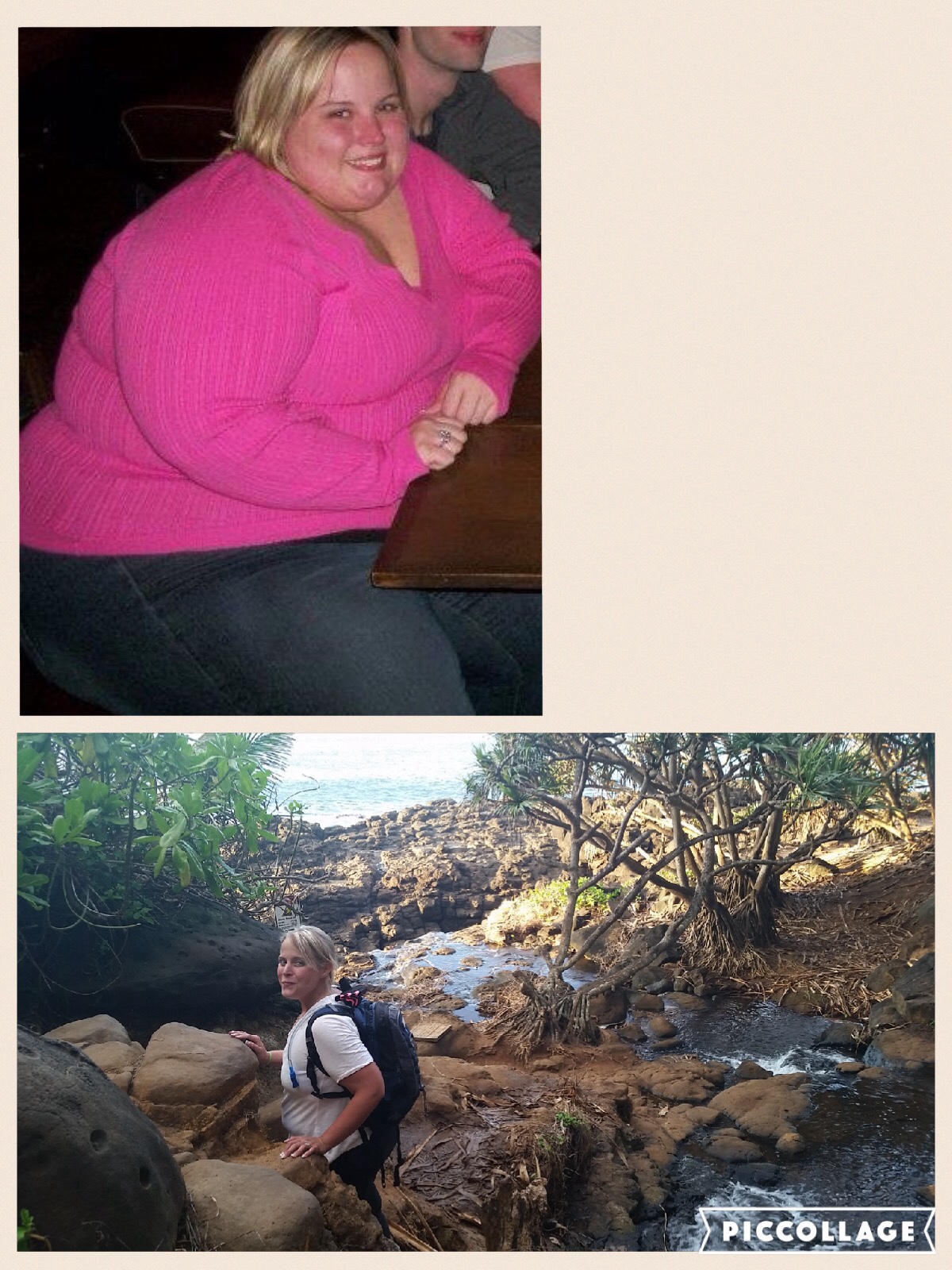
I do look at before and afters it's difficult to believe it's me. When I look in the mirror Insee that 515 lb girl. Sent from my iPad using the BariatricPal App
-
In the bathroom you can always light a match and put it out afterwards... Unfortunately since my ds surgery I have to go at work a lot and this helps the odor without spending so much on poopouri and sometimes spraying doesn't cover it. I am still searching for something to help with flatuance spray just mixes with it. I eat very clean actually and things like spinach and other veggies make me do this. Also the salad dressings, I only use enough to taste it. Hope this helps some!
-
Thank yall for the kind words... idk what would have to happen for me to feel successful. I would think definitely think it was amazing if I was talking to someone else.. I know I am way to mean to myself with my self talks.. i am stuck on the number, i want to be single digit size clothing and loose 40ish more lbs Sent from my SM-N920V using the BariatricPal App
-
Thank you!!! I need to transition my mindframe Sent from my SM-N920V using the BariatricPal App
-
Hi all, I am 4yr post op from the ds. When I started I was over 500 lbs(515ish), now I am at 198-200 but feel like I am stuck.... I am definitely getting over 110 grams of Protein a day, working out vigorously (I feel anyway), tracking my food with time of day and mood, but I feel like I should at least at my goal by now. How much have you been able to loose, and are you happy with it? I have made myself feel like a failure.. Any suggestions? Sent from my iPad using the BariatricPal App
-
Or learn to make you own from Pinterest Sent from my iPad using the BariatricPal App
-
Thanks for all the great feedback!! I will try the nectar again I tried a lot of things right after surgery and maybe my tastes have changed since... I am just trying to get back to 100grams Protein a day... Sent from my SM-N920V using the BariatricPal App
-
So I am 4 years out and trying to get back to the basics.... Have any of you tried the Isopure (comes in glass bottle) that are flavored? I saw coconut, grape etc. just wanted some input! Also have you ever made Popsicles out of van Protein, almond milk or coconut milk, and fruit? Outcomes? Sent from my iPad using the BariatricPal App
-
You look GREAT! The body image issue is a huge problem for me as well... I still see myself the same as I did before, not sure how to break from that cycle. Sent from my SM-N920V using the BariatricPal App
-
I have this issue, but I haven't figured out how to love myself with it... I'm actually not at my goal weight yet, but feel like my excess skin on my tighs, hips, and tummy could be part of that... Sent from my SM-N920V using the BariatricPal App
-
Sent from my iPad using the BariatricPal App
-
That is very true, legally they cannot say anything to you or ask for specifics or tell you when you can or can not have it done... Sent from my SM-N920V using the BariatricPal App Unfortunately, I've had to use it 3x 1 for a broken foot 1 for the surgery and 1 for foot reconstruction Sent from my SM-N920V using the BariatricPal App
-
You should speak with your hr department.... generally you want to apply for FMLA to be certain your job is protected... also in my case anyway my short term disability doesn't kick in until day 10 so I had to use sick time for those days Sent from my SM-N920V using the BariatricPal App
-
Zucchini noodles for sure! Unless you're trying to make lasagne then I've used butternut squash or Zucchini before... spaghetti squash is more like a sweet angel hair or smaller to me Sent from my SM-N920V using the BariatricPal App
-
Not really if love to drop another 20-50 but that might be some of the skin I want to have removed... the 10 lbs didn't bother my skin I was just super excited about loosing it bc of the being stick for so long Sent from my SM-N920V using the BariatricPal AppCongrats! You look beautiful!Thank you!I hear ya the whole thing is pretty intense. Sent from my SM-G900T using the BariatricPal App I really considered asking about the 360 but not so sure they are willing to do that... Sent from my iPad using the BariatricPal AppPossibly... I really want to muster up the courage to see a plastic surgeon Sent from my iPad using the BariatricPal AppTy I just have to be better at seeing it myselfI still have about 20-50 I'd love to shed, just changing up some things now again, so I will get there Sent from my iPad using the BariatricPal AppTy yes I feel amazing! I'm very happy with my surgery of choice... I have a lot of friends that have made others and I know that this was absolutely the best for me especially for my long term... Sent from my iPad using the BariatricPal AppI was 24 when I had my duodenal switch, I have pcos, and had sleep apnea, plus a ton of other things, they actually say the ds and Rny are great for diabetes I think I'm not sure, (which could easily become an issue with having the pcos) I am so glad I did the ds because I've had amazing results, can have a bite of something if I really really want to. I don't have the diarrhea some do but then again I don't eat high in fat foods, at least not the bad fats... I have problems with lactos, but I had a bit of. Problem before the surgery... Sent from my iPad using the BariatricPal AppHave you looked at the ds surgery? Sent from my iPad using the BariatricPal App