SuzzyQ_delli
Pre Op
-
Joined
-
Last visited
Everything posted by SuzzyQ_delli
-
I got it from The Vitamin Shoppe
-
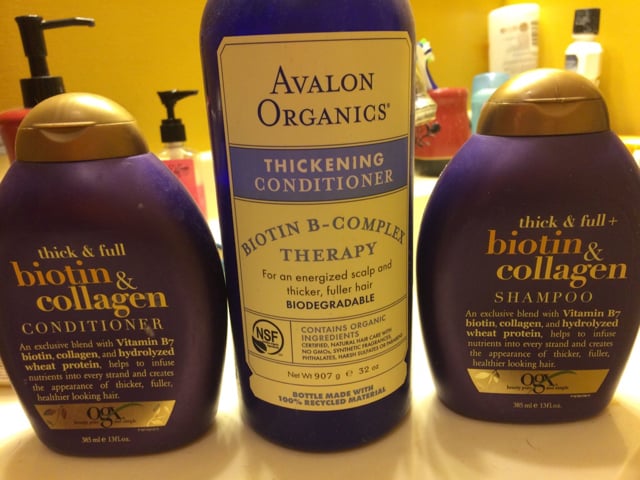
I luckily have not had a lot of hair loss. I think it accounts to a few things... I've been taking 10,000mcg of biotin before surgery, my body never refused any food and I never got sick so I was able to get in the protein I needed pretty early on. I also use the following products.

-
I feel like I ate more these last couple months and would eat a larger portion and more frequently. Just recently I can barely eat anything and have to force myself to eat. Is this happening to anyone else?
-
Thanks guys for all the pointers!!
-
Ok I'll try that!! I struggle the most with fluids for sure!!
-
I get anywhere from 80-100grams a day. Water 50-64 ounces
-
So after the big loss with the pre-op diet and the 1st month after surgery was a 14lb loss. I am now only losing about 7lbs a month. I get all my protein in and exercise 5x a week. Sleeve weight 274 current weight 242. Does this seem like a slow loss compared to most of you? Don't get me wrong I'm stoked!!! I just really wanted to get under 200lbs and at this rate it's not going to happen. Oh I am also 5'10"
-
Hey Nashville!!! I had my surgery with Dr. Westmoreland in Murfreesboro!
-
. I have also had wine. I do a sweet wine and do 1/2 water 1/2 wine still tastes delicious. I still have not exercised, I just don't have the energy but that is because I found out I am vitamin d deficient. The dr now has me on a weekly D vitamin and a monthly B injection. I'm hoping that helps!! And yes I take my multi vitamin everyday.
-
Where is everybody at with their weight loss so far AFTER surgery?
-
I am!! Only down 20lbs since surgery I am 7wks out. I am down 35lbs total from start of liquid diet. I have been on a 2 wk stall.
-
Don't stress as you know the scale will move soon. I get 10,000 steps in 5 days a week. I also lift 8pd weights at home at night. I'm basically burning over 1/2 of the calories I eat each day. Let's keep each other motivated!! how much Protein and calories are you getting in a day?
-
I could not find it as well
-
For all the ladies that have lost a ton of hair can you tell me when did you start getting all your protein in after surgery? I heard this is the actual reason we lose hair that hair growth & loss is a 3-4 mos cycle so it all depends on how well you maintained your protein after surgery. I just want to see if there is any truth to that so of y'all could write how long it took to meet protein guidelines, how much protein you were getting and if you had noticeable hair loss. Thanks!! Maybe if we see a pattern we can help upcoming ladies!!
-
For all the ladies that have lost a ton of hair can you tell me when did you start getting all your protein in after surgery? I heard this is the actual reason we lose hair that hair growth & loss is a 3-4 mos cycle so it all depends on how well you maintained your protein after surgery. I just want to see if there is any truth to that so if y'all could write how long it took to meet protein guidelines, how much protein you were getting and if you had noticeable hair loss. Thanks!! Maybe if we see a pattern we can help upcoming ladies!!
-
I got mine 2 days before surgery!!! Talk about ugh! Good thing was when it was finally over (it did last over a week not typical for me) I woke up one day and was down 5 extra lbs!!
-
Good Job! I was sleeved 2/18 and have only lost 11.8lbs so your doing fantastic! I am down 33.8 all together so I am happy about that.????
-
Hey @It's Time - a day in my pouch is basically like this.... Breakfast - a Protein Shake in the morning using lactose free skim milk, scoop of GNC Pro Performance whey Protein (currently Cookie N Cream) sometimes a splash of sugar free flavor syrup and other times 2T of PB2 so my protein shake is usually 32-37g of protein. (Takes me about an hour to finish it though) Lunch - flavored tuna pouch mixed with a little plain Greek yogurt or a portion of Shelly's Ricotta Bake Mexican Style so lunch is 14-16g protein Dinner - this one really varies as I try to have something very similar to what I fix for my family mine just gets dumped into my NutraBullet first and I skip the carb heavy stuff like mashed potatoes so dinner is around 16-26g protein. Example last night I made Shepard's pie from Friday's leftover crockpot roast with potatoes & carrots. I shredded the roast, drained the carrots and potatoes then skinned the potatoes tossed both in the food processor with Greek yogurt & seasoning to make the "mash" for the top. I added the roast to the juices I drained from the veggies, added a splash of Worcestershire, 1c shelled edamame (they don't like peas) and some salt & pepper. I filled individual ramekins with the meat filling (tossed mine in the NutraBullet with a little beef broth first) then topped theirs with the mash, mine with some fresh parmesan! In the oven and BLAMO awesome dinner for everyone and no one even realized it was reinvented leftovers. My portion had 26g protein! Snack - this one is my favorite. PROTEIN ICE CREAM!!!! I have 1/2c-1c of this awesome yumminess depending on what my protein was for he rest of the day. I try to get 90ish grams a day. 1/2c of my protein ice cream is right at 20-21g of protein per serving and it goes down really easy. I even invested in a new ice cream maker just for this daily dish of awesome - I got it free using my credit card points (from being self pay) on amazon.com heehee Last but not least I usually have 1 piece of Russell Stover plain dark chocolate - it even has 1g protein so I savor it! Today is my birthday so I'm going to try playing around with making a 5 minute microwave high protein cake and see how that turns out and how many grams of protein I can squeeze into it! So everyone - please tell me how its going! Are there any food type things I can help you with or experiment with to help you get to a better you? Let me know!!! Ummmm WOW! Can I move in? I am not even close to being that creative! How do you make the ice cream?
-
I am down 33lbs from 2wk pre op. Diet. I had surgery 2/18 so I am a newbie but I can already tell my stomach has shrunk and my face is skinnier.

-
Absolutely beautiful Megan! You were gorgeous before but that smile though????
-
I signed up for my first 5k also. It's the color vibe, so not a real (timed) race but a great way to get more active. I'm so excited to start doing the things that barriers (real or perceived) had prevented me from doing for so long. The Mud Run is on my list and zip lining also. Life well lived... Here I come! Sent from my 6045O using the BariatricPal App I also signed up for a Color Run in May! And mud run and zip lining are also on my to do! Add in adult Disney World and indoor rock climbing! Hope I will be able to check these off my list one by one! Where do you live? I'm in Nashville, TN.
-
Are you taking your Vitamins daily? I still find it difficult to get that much protein in and all my liquids. I notice if I haven't drank enough and get extremely tired. yes I do
-
I hope you don't mind me sneaking in???? I need advice from my older sleevers!! I was sleeved on 2/18 and doing ok almost getting in all my liquids a day and averaging 80-85grms protein but I have ZERO energy. I see everyone else walking and starting to do light exercise and I ran to the store for 30mins then slept 5hrs! What the heck!! I feel like I'm tired all the time I sleep about 6-7hrs each night but then also take about a 4hr nap during the day. Should I be worried? I really want to start walking but my body says no way! I had a ton of energy before surgery and would hike with my dogs about 2x a week and so exercise videos I feel like I went backwards instead of forwards.
-
she's beautiful!! And congrats to you and your family!!
-
I can sleep on my left side but not my right yet where I have the larger incision.