cab127
Pre Op
-
Joined
-
Last visited
-
-
Hi, I have had two bowel obstructions post rny The first almost a year after the surgery and it took me about A month to recovery. I felt that the obstruction was hard to recover from because I had to go back to a liquid/soft food diet. The second time around about nine months later I had a speedy recovery after surgery I was back at home within 24 hours and back at work within three days. Hope You have a good recovery
-
-
-
-
-
-
I never shared my surgery with people. I figured it was no ones business
-
-
I had surgery Jan 2015 and am in Brampton.
-
-
-
-
HiI am almost one year post op rny. I had severe pain last week and went to ER. Turns out I had an internal hernia at one of the "new joints" and surgeon had to go in to repair it right away. Recovery not so bad
-
-
-
-
You look amazing
-
-
-
-
I had the rny and it was the best decision for me. The weight is coming off slowly but I feel great and now love how I can move and exercise like never before. I love the new me that I see evolving each day☺️
-
-
-
-
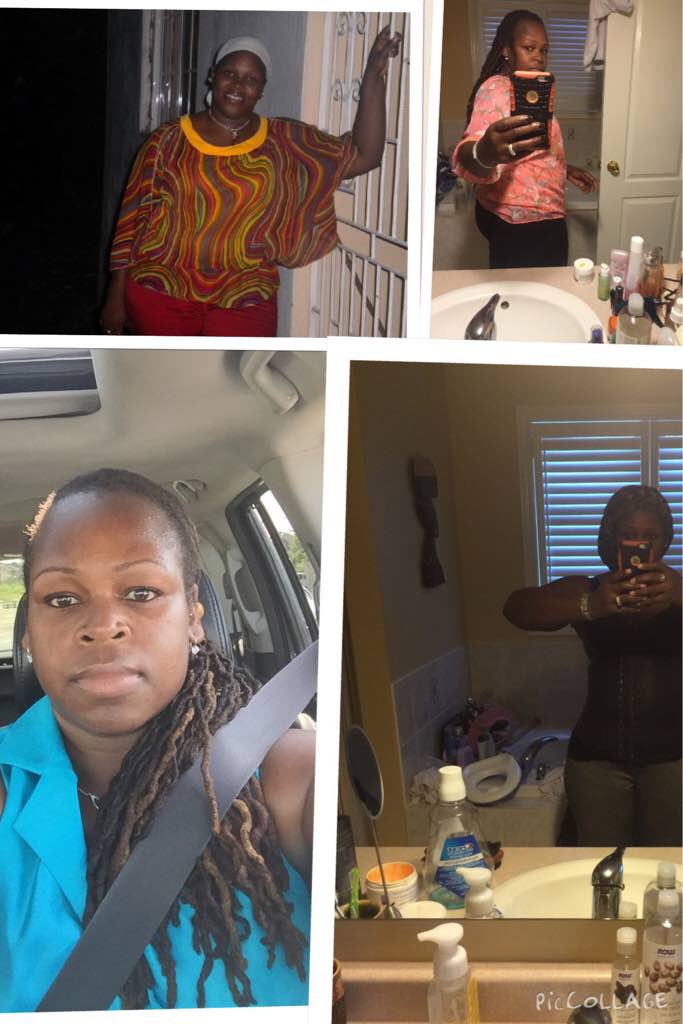
Top right before surgery HW 293 CW 204.5 9 months post op

-
-
Hi all It's been awhile since I have been on My starting weight 298 My current weight 207.5 Total loss at 9 months post op 92lbs. This has been the best thing I could have every done for myself
-
How did it go? So excited for you!!!
-
Since you've done so much already probably after your first appointment You can get things sped up. Remember to bring all your test results etc. After that it's really a calling game call call call to get the rest of your appointments sped upThanks for the encouragement. I am calling every few days and trying to get something anything! booked. Some people who started at the same time as me have had their surgeries, which frustrates me. I'm not giving up though. I get the feeling they make this process so painful to weed out people who aren't serious. Lol I'M NOT GIVING UP! ???? Don't give up. Once this gets started you will sail through things. Remember too you are getting the best service at TWH. I swear ????
-
So I am about 2 months post op (I had the rny). And while my recovery has been good. I have notice that my stomach still looks and feels bloated. Anyone have any insight as to why? Should I raise this issue with my nut/nurse?
-
I was in the hospital for two days and be for two weeks and then back to work
-
@@freshair I am doing well so far. I have been dealing with some gas issues but aside from that things are welll. I am on puréed diet now. So trying to find things that sit well through trial an error. I guess the biggest challenge is figuring out when to stop Eating before that pain sets in. Some foods I can eat the recommended amount and others not so much. I have only dumped once and it was not a happy moment. Overall, I have to say things are good. Getting in all my vitamins and working on getting in more walking. I went back to work so it's an adjustment to fit everything in
-
I am in Brampton. Would love to connect. I had Surgery Jan 13
-
I agree very little pain and trying to get my protein and water in