veronicalynnnnnnn
Pre Op
-
Joined
-
Last visited
Everything posted by veronicalynnnnnnn
-
I don't either which is what I've got now..my hair is falling out. I've literally lost 9 lbs this WEEK. It doesn't seem healthy but I can't seem to make it stop.
-
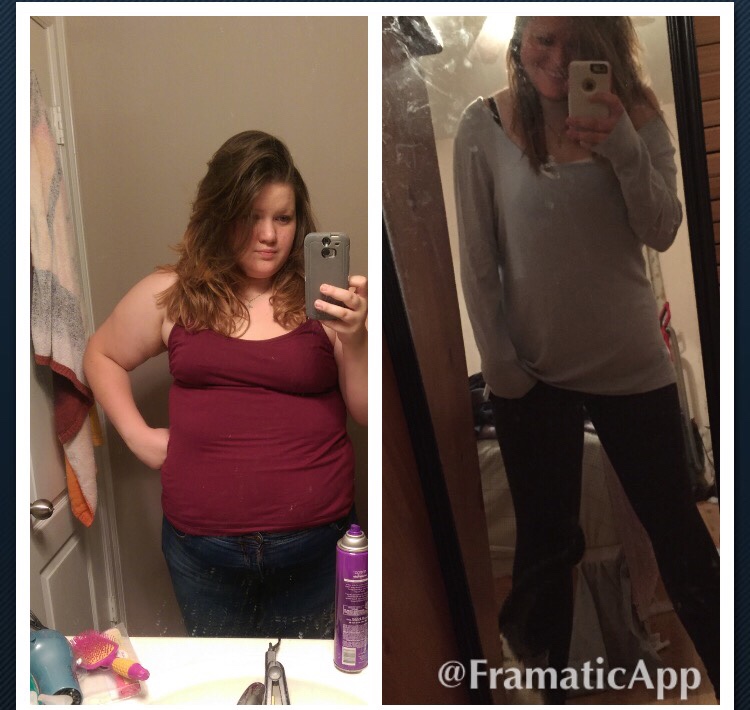
4 months out 90 lbs down!


-
24
-
I have seen a lot of posts about the weight loss stalls and it not going fast enough...but I haven't seen many lose weight as fast as I am. My highest weight was 296 and currently I'm at 205, 4 months out from surgery. I know we all lose different but someone tell me I'm not alone!!!!
-
I will miss having something to blames my insecurities on. I've always been confident but sometimes that falters...it's always been because I was having a fat day. Which as a woman I'm entitled to even if I get down to a size 2! But now I'm going to have one less thing to blame.
-
I've had maybe 1 or 2 stalls. I'm 2 1/2 months out and I'm down about 65 lbs from my heaviest weight..I get the "is that even healthy?" Talks from family. But I get in my protein and water..I've been worrying about losing too much but I figure it was a big step to be healthy so my body will stop when it's ready
-
The more foods I try the more it happens...usually when I've eaten too much or if I drink too close to my eating. It's really just learning your body
-
I'm almost 10 weeks out and eggs are still kinda tough...I've heard it from a lot of other people too. There are certain foods that my sleeve just doesn't like. Right now it's ANYTHING from the dairy section
-
Can't see the pic!!! Those are the stats I'm hoping for in September 2015!!!
-
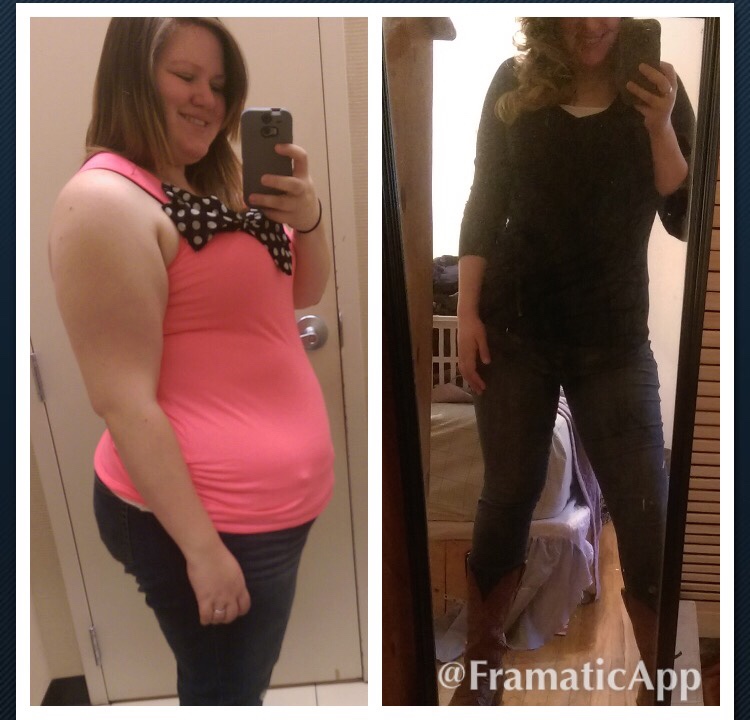
2 months out/56 lbs down...until I saw these pictures side by side I didn't realize how much of a difference it really was. HW-296 SW-290 CW-239 I still have about 70-80 lbs left to lose, but I got a personal trainer as my Christmas gift and I'm sore all over!!! "Pain is weakness leaving the body"
-
I'm supposed to be at 95g and I'm having to do shakes and protein bars to fill in the missing gaps in my diet..it's the hardest part for me.
-
I work at pizza hut...it's hard to go to work and watch everyone eating one of your fav foods and having to go eat ANOTHER fish or chicken breast.. but I'm starting to see the difference and even though everything is making me sick right now I know it's worth it.
-
I'm actually having the same problem. I was sleeved 10/29 and I can't seem to keep anything but liquids down. I'm still mixing protein in soup. I hope someone can help both of us!
-
I lost 40 lbs in a month. I didn't lose at all for two weeks and felt the exact same way. Only difference is after that first week of no losing I put my scale up for a week. Right now I'm going down between 1-2 lbs a day. It seems like the days I do well no loss the days I cheat and have a snack or something not quite healthy I'll lose way more!!! It's crazy. I read on here it's just the increase in calories so I'm trying to find a healthier way of doing that. I felt regret for the first month but I went from a 26 pant to a 20!!! It's just emotional and my body isn't doing what I expected it to..
-
I had my gallbladder removed when I was sleeved 10/29. I can't tell if my issues are due to sleeve or no longer having a gallbladder. But I'm sick every time I eat no matter how small and also have become lactose intolerant
-
My surgeon started me on soft foods after my two week check up. I am losing fast and he always seems concerned. Post surgery I'm down 32 lbs in 3 weeks. I'm planning on a little broth soaked Turkey and mashed sweet potatoes for thanksgiving!!!
-
I'm three weeks out and I didn't tell anyone but my husband and my mother pre surgery. After I've told a few strangers (retail people, the guys at gnc) I don't like it. I will have my tiny meal on thanksgiving and that'll be it. My generic response for not eating is if I don't change my habits nothing will change, then I go for a walk. I love losing and am actually down about 30 lbs in the three weeks post op.
-
I have a 1 yr old and honestly this was the hardest part for me!!! I actually had a post a lot like this. Me and my Dr made compromises. I can't pick her up from the floor if I'm standing. But I can sit on the couch and pull her in my lap. I can't stand with her if I'm sitting but someone can hand her to me for short periods of time...it's not nearly as much loving as I'm used to giving her, yes, I'm "that mom". But it's better than not holding her. I was sleeved on October 29 and the worst I've done is taken her out of her car seat, she got to walk to the door by herself though!
-
It's already been 4 days and at this point it is almost unbearable.
-
I've walked, I've taken gas x, tried stairs. I've done everything right..I feel like there is no pain from surgery only has. Someone help me please
-
I'm still in preop stages..I'm looking to have surgery about 2 weeks after my daughter's first birthday. Does anyone have any advice/warnings? I will have my husband and mother to help me. Thanks in advance!
-
My baby is turning 1 the end of September and I'm hoping to get scheduled for my surgery mid October..has anyone gone through the healing process with young children have any advice or warnings? I will have my hunsband and mother for help.
-
Not eating. Even now I'm struggling to stop eating when I'm full...I think that'll always be the hardest part. My whole day has always revolved food. I'm hoping to finally break that cycle
-
How many weeks is everyone's pre-op diets?---as long as I lose the 15 lbs before surgery I'm not required to do the liquid diet. I have my last visit of my 6 month insurance required diet this month and my egd. I'm hoping for October