AZDee
Gastric Bypass Patients
-
Joined
-
Last visited
Everything posted by AZDee
-
With a estimated 11% of women having this disorder I would say quite a few of these ladies have followed similar paths of surgeries not realizing the root cause to their issues.
-
After losing the needed weight to finally get into the normal weight category one would think life is good. But that is not always the case. For some of us we are left with a body that we would not want to be seen in a bathing suit. For many there is extra skin that needs to be removed which seems to be covered in length here, but I would like to address something else, a disproportioned body that is left after the weight loss. I was super thing on top but my lower body was still a mess. I had no idea that there was something else going on...my legs had fat pockets around the knee area that just would not come off and also saddle bags from hell...These things really stand out when you are otherwise thin. So I went for a lower body lift to help with those things. Only problem was after the surgery I found my self now gaining weight. I had not changed my eating and in fact I was now dieting and trying to lose it but with little response from my body. My calves that had been so wrinkly due to weight loss were now filling back up and getting tight. Then one day as I was feeling my swelling of my calves I noticed this little ridge right above my ankle. What the heck was that??? I am well over a year from surgery for the lower body lift, so it is not swelling from that. Turns out I have a condition that 11 percent of women have, it's called lipedema. I have a different type of fat cells in my lower body and also in my upper arms which cause them to expand weaken and be filled with Fluid that leak and cause swelling. Lipedema can be trigged by certain events such as puberty, pregnancy and surgeries (such as in my case). Actually mine I am sure started when I was 14 and went from a underweight child to a overweight teen in just one year. One does not have to be over weight to have it, it's just many people that are overweight have both kinds of fat. Left untreated will only get worse and could lead to a condition that my Mom had that was diagnosed as lymphedema and caused her to be in a wheel chair for the last 20 years of her life. I now believe she actually had lipo-lymphedema it's actually lymphedema that started out as lipedema and was never treated. I always remember my Mom being fairly thin but having these really big legs. I just thought my sisters and I were built the same way as my Mom. Had no idea this is a condition that can be passed down. In fact one of my daughters has just received her official diagnosis of lipedema. Lipedema has 4 levels and if untreated could progress. I am in a later stage 2. I write this to warn any of you out there that may think you have a disproportioned body that is resistant to diet, to look into this. Lipedema fat is unaffected by diet, so weight loss whether it be by diet or surgery will have no effect on it. These cells need to be removed, the current treatment for this is what is known as WAL liposuction , (Water assisted liposuction). Where the surgeon injects a saline solution and then flushes out by liposuction the fat. This procedure is a gentler way of removing the fat without disturbing the lymph system. This is usually done with twilight sedation. With 11 percent of women having this condition, which for the most part goes misdiagnosed as simply being overweight, I know there are many here that may in fact have this disorder too. The good news is the medical community is becoming aware of this condition and insurance companies are now starting to pay for treatment. The WAL liposuction is not a cosmetic procedure even though there are some cosmetic benefits too... I urge you to do a google search of Lipedema and see if you have any of the many signs of this condition. .
-
I recently posted my story about Lipedema in the Plastic Sugery forum...With 11% of women suffering from this disorder, I am sure there are many women here who have it and do not know it yet....It's so important to get the word out.
-
It's not that it's rude, it's just there are so many variables....Personally I would not want to go to a surgeon that charges everyone the same amount and then does cookie cutter same surgeries on everyone...I have had enough of that...I would say do your own homework, and send pictures and have online/phone consults with several doctors and they will be more than happy to give you a price. I would feel really bad if someone on here gave me a price of their surgery and then I called and was given a different price. I got about 5-7 different quotes so I could choice the best surgeon and also make sure his pricing fell in line with others.. Also do not be afraid of in the United States Plastic Surgeons prices, I was and later found out some of the very best fall in line with out of the country surgeons. If I were you, I would also give Dr. Peter Fisher in San Antonio TX a call, you just might be very surprised.
-
After losing the needed weight to finally get into the normal weight category one would think life is good. But that is not always the case. For some of us we are not left with a body that we would want to be seen in a bathing suit. For many there is extra skin that needs to be removed which seems to be covered in length here, but I would like to address something else, a disproportioned body that is left after the weight loss. I was super thin on top but my lower body was still a mess. I had no idea that there was something else going on...my legs had fat pockets around the knee area that just would not come off and also saddle bags from hell...These things really stand out when you are otherwise thin. So I went for a lower body lift to help with those things. Only problem was after the surgery I found my self now gaining weight. I had not changed my eating and in fact I was now dieting and trying to lose it but with little response from my body. My calves that had been so wrinkly due to weight loss were now filling back up and getting tight. Then one day as I was feeling my swelling of my calves I noticed this little ridge right above my ankle. What the heck was that??? I am well over a year from surgery for the lower body lift, so it is not swelling from that. Turns out I have a condition that 11 percent of women have, it's called lipedema. I have a different type of fat cells in my lower body and also in my upper arms which cause them to expand weaken and be filled with Fluid that leak and cause swelling. Lipedema can be trigged by certain events such as puberty, pregnancy and surgeries (such as in my case). Actually mine I am sure started when I was 14 and went from a underweight child to a overweight teen in just one year. One does not have to be over weight to have it, it's just many people that are overweight have both kinds of fat. Left untreated will only get worse and could lead to a condition that my Mom had that was diagnosed as lymphedema and caused her to be in a wheel chair for the last 20 years of her life. I now believe she actually had lipo-lymphedema it's actually lymphedema that started out as lipedema and was never treated. I always remember my Mom being fairly thin but having these really big legs. I just thought my sisters and I were built the same way as my Mom. Had no idea this is a condition that can be passed down. In fact one of my daughters has just received her official diagnosis of lipedema. Lipedema has 4 levels and if untreated could progress. I am in a later stage 2. I write this to warn any of you out there that may think you have a disproportioned body that is resistant to diet, to look into this. Lipedema fat is unaffected by diet, so weight loss whether it be by diet or surgery will have no effect on it. These cells need to be removed, the current treatment for this is what is known as WAL liposuction , (Water assisted liposuction). Where the surgeon injects a saline solution and then flushes out by liposuction the fat. This procedure is a gentler way of removing the fat without disturbing the lymph system. This is usually done with twilight sedation. With 11 percent of women having this condition, which for the most part goes misdiagnosed as simply being overweight, I know there are many here that may in fact have this disorder too. The good news is the medical community is becoming aware of this condition and insurance companies are now starting to pay for treatment. The WAL liposuction is not a cosmetic procedure even though there are some cosmetic benefits too... I urge you to do a google search of Lipedema and see if you have any of the many signs of this condition.
-
So happy for you, you look great and it's only going to get better!
-
The lower face/neck lift, breast lift and implant, plus the arm skin reduction surgery was all done at the same time so I received discounts, I think I paid around $10,000. I went to Tijuana Mexico for that set of surgeries. If you are interested in having surgery in Mexico, I recommend, Dr. Victor Gutierrez. I am having one additional surgery a long thigh lift, and that one will be done in the states, with a surgeon who specializes in weight loss, patient's plastic surgery. His name is Peter Fisher and he is located in San Antonio, TX. His prices are very good too, so if you want it done in the US please check him out. You can contact his office they will have you send photos and then the Doctor will call you and give you his opinion on what procedures would be best. There is no heavy sales push with either of these doctors...
-
I so believe it has to do with ones overall health, just how strong of a rebounder are you. One day before I was to leave for my lower body lift last year I watched a youtube video from a lady in her late 50's who is also a nurse and was in really good health, who was up and active after two days from having her lower body lift. I saw that and claimed the same victory. When I posted my plan of being mobile in only a couple of days most people said "good luck with that" but believe it or not I was...I did take things slow, but was out and about after a week. Now granted I wasn't standing as tall as I normally do, but in a week or so I was back at my desk at work for a few hours at a time...With in a month I was pretty much back to my ole self...
-
I so agree about Plastic Surgeons websites, and of course they only show you the very best pictures, that's why I love to check out the Doctor on realself.com where actual patients write the reviews and post pictures, so you get to see the good, the bad and the ugly!
-
I've had quite a lot of work done and scaring was my biggest concern. I know understand you need to make sure of a few other things besides the beautiful cut and sewing you desire. I too thought Mexico was going to be my only option and some of the surgeons are lower than the states and some it turns out are about the same. So do your homework. In my saying that I mean take the time to have consults with several surgeons before deciding. Send your pictures, have phone interviews with them, not only get their prices, but find out exactly just what they plan on doing, such as lipo, and where they plan on placing the scars, how much they plan on removing, how they plan to lift an area. Not all surgeons do things the same and not all patients come out looking the same with a similar surgery. Personally, I have learned all this the hard way after having a total of 6 procedures done in 2 very major surgeries at two different locations. I still need to have more surgeries to improve on things. As it turns out, I am able to afford one of the top Plastic Surgeons who specializes in WLS patients, Dr Peter Fisher in San Antonio, Texas. I knew of him before and had seen his beautiful work, but assumed his prices must have been very high and as it turns out they are not. So please do your homework assume nothing and make sure you know exactly what you are getting before you go....
-
Not sure what city you area referring to, but if it's Tijuana, I would say the best hotel there is Hotel Lucerna Tijuana, I've stayed at the Marriott and I believe the Lucerna is much nicer....
-
I am usually pretty disciplned with what I eat, but yes after surgery I was starving...i had read so many stories about those having skin removal and losing even more weight, I was expecting to be down 10 not up 10! Sorta reminds me of WLS, when I heard all the stories of those who the weight just fell off...not me I had to fight hard for every pound as I continue to do so today.
-
Has anyone else noticed weight gain after having a skin removal surgery? When I had my first surgery which was three procedures at once, a lower face/neck lift, a arm lift and a breast lift with implant, I was in such pain that I babied myself with food during recovery. Eating what sounded good and not really noticing fat or carbs, then after recovery I found myself up 10 lbs. rather than being down some weight which I was expecting. Then last year when I had my lower body lift, I told myself I wasn't going to let that happen again, but low and behold that 10 lbs. came back. I have heard there is swelling and that could be part of it. But shouldn't the removed skin take care of that weight? I have a good friend who has had a total body makeover and has had this same thing happen, so it makes me wonder if it's some part of self destruction that's deep inside of us??? I am currently getting in the best shape I can so I will be as fit as possible when I go in for my long thigh lift at the end of summer, and this time it's not going to happen...hopefully.
-
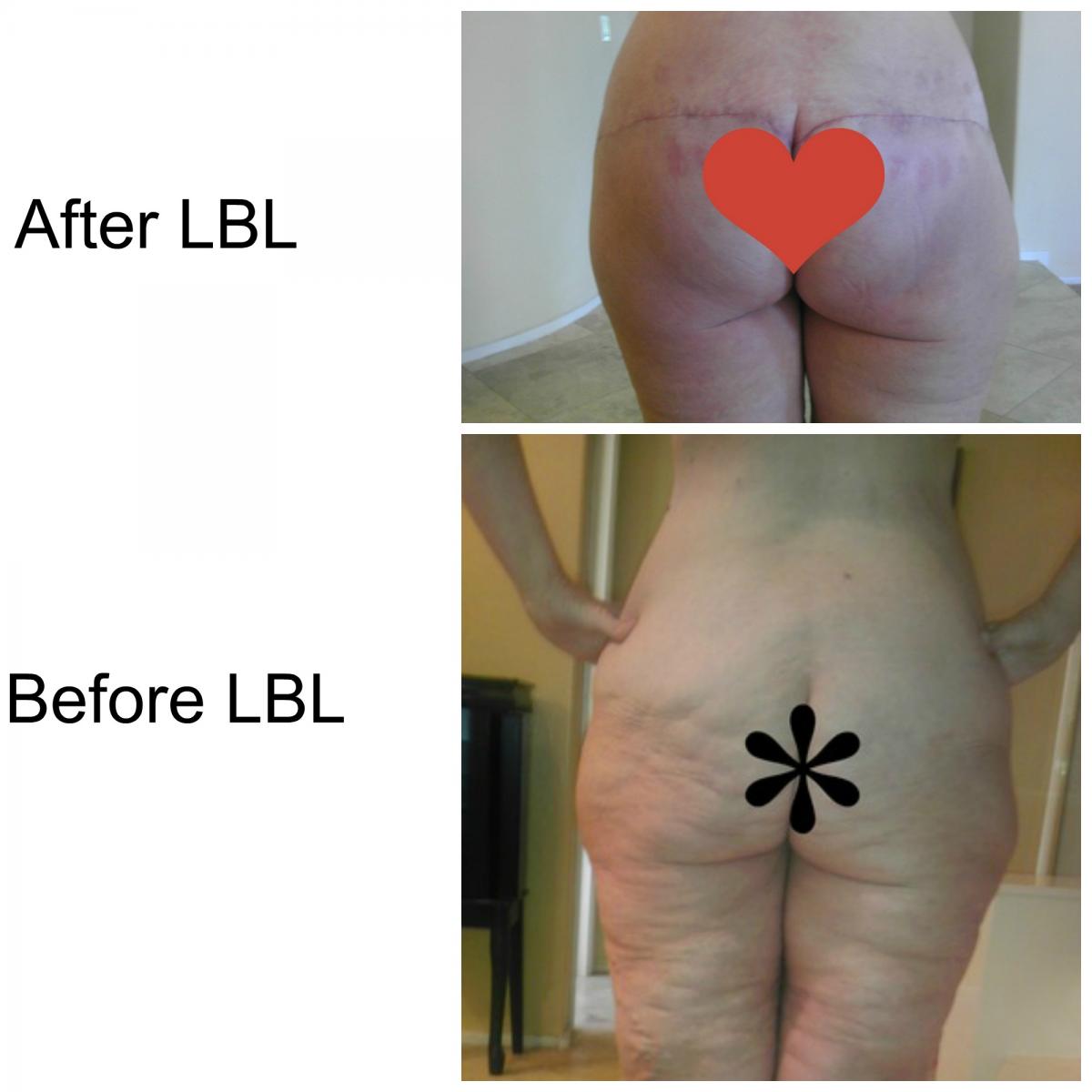
I also had the BBL where he took the attached back flaps (the love handles) that were still attached to the blood source and inserted them into the butt...He also did the groin thigh lift which turned out not to be enough to fix my thighs. Then over the course of the year as the butt implants settled deep into the butt, they started to push on the already too large saddle bags. So now I pretty much look deformed with smaller hips (thanks to the LBL) then the huge saddle bags...IT turns out I did not get any lipo to the saddle bags due to my age being over 50. So Dr Fisher who determines your ability for surgery to your physical being rather than your number age, will be doing the long thigh lift as well as the lipo to the saddle bags!
-
And to think I talked with this surgeon before I went to Mexico for my LBL (which was good but did not get my long thigh lift)but I was sure he was going to be very expensive due to his credentials so I never sent in my photos. Then when I did meet him several months ago after the urging of my friend, his first words to me were, "Finally we meet, I thought for sure you were coming to me for your LBL" I should have sent in my pictures and got my quote as I would have already had the long thigh lift with the LBL. And then to find his prices the same as what I paid going across the border, WOW that was a big mistake on my part. Don't get me wrong, I have no issues on my Mexican surgery, I just needed more work than that surgeon was able to do. So now Dr. Peter Fisher will be finishing my Plastics with the long thigh lift and the much needed lipo of my saddle bags!
-
Just yesterday, my friend who had the "works" done came to visit me and I was able to see her scars 6 months out from her very long thigh lift and they are healing very nicely. She was the one who had the thigh lift that went down about 8 inches past the knee. I don't plan on doing anything like that just down to the knee. I have always carried the majority of my weight in my legs and I have really wide knees and after weight loss I have so much left over skin that the inner lift didn't help the knee area. I am lucky in the fact I heal really well, so the scars turn white in know time and since I naturally am so white it all blends. As long as I have a fine line incision I am pretty good and both surgeons that I used and plan to use are trained as Micro-Surgeons so they cut and sew very nicely. Hopefully this will be the end, I hate to be close and not completing it all...
-
That's great, glad your happy what did you have done?
-
Honestly I had seen his work and was impressed when I was planning on having my LBL last year. But after visiting another "top specialist" of weight loss patients in CA, and being given a $40,000 estimate, I did call Dr Fisher's office and was told to send pictures, but I never did, thinking I would only be wasting mine and his time....Big mistake, I should have followed through. Even though I was very pleased with the outcome of my LBL with a different surgeon (Dr. Gutierrez in Mexico) I did not get the long thigh lift that I so wanted, as my surgeon was not comfortable in doing so, and also doing any lipo on me do to the fact I am over 50. So when all the swelling settled I found I still had issues with my lower half. A good friend who had the "works" with Dr Fisher, spoke to him about me and he urged her to have me seek him out, so I flew to Tx and meet with him. He feels he can give me the results I though I would never be able to have, so later this summer, I plan on traveling to San Antonio and having my long thigh lift and the much needed lipo to my outter thighs, and the price, very low...
-
If you are sure you want to stay in the states and not go to Mexico, then I would contact Dr. Peter Fisher in San Antonio, he is known as one of the countries top Plastic Surgeon who deals with many bariatric patients. His practice is made up of 80% of weight loss patients in need of skin removal. And his prices are very affordable...
-
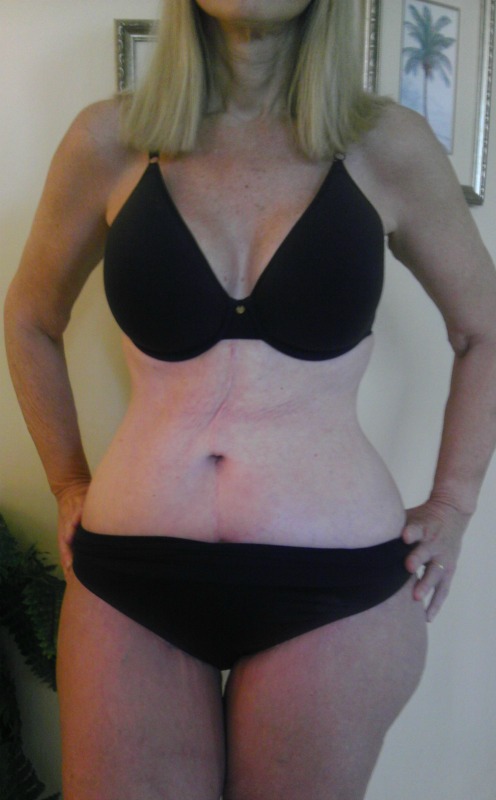
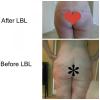
Here are a few of my before and after Plastic Surgery. I didn't take too many photos before... Not too bad for a 60 year old lady! And Newsetofcurves you are going to love your results! Dr Peter Fisher is amazing...he will be doing my long thigh lift later this summer...can't wait!




-
All the Doctors mentioned above are really good, I have had surgery with one listed above and I am having surgery with another one mentioned here. Realself.com is how I too found my surgeons. I have had two surgeries in Mexico both doing several procedures at one time. I had no issues, but don't think you have to go to Mexico to be able to afford surgery, I thought that at one time, but now I am planning one more surgery in Texas and it's very affordable. Where ever you go, just make sure you have the doctor of your choice, that's what I did, and he just so happened to be in Tijuana. As far as the twilight sedation goes, the first clinic I went too in Mx did not use it and I was in recovery overnight it was all a blur...The second surgery, different Doctor, I was given the twilight sedation, I was basically out, waking up when they turned me over, but when they were waking me up to tell me it was all over, I felt normal and refreshed as if I had a full nights sleep. I love the twilight mainly because of the risks involved with traditional anesthesia
-
I have gone to two different Plastic Surgeons in Tijuana Mexico, and although the first one had a beautiful state of the arch Facility, Cosmed, my results were not all that wonderful. My second plastic surgery, was with Dr. Victor Gutierrez, as listed my another poster. And I am in full agreement with her assessment of the surgeon. He is a wonderfully gifted surgeon.
-
I like how you mentioned the belly button. It was the belly button that caused me not to go to one particular surgeon that so many women have used...I searched and searched for just the right person to do my LBL and still keep my belly button looking the same. Mine looks exactly the same as it did before surgery. I would swear it was only I had a mole about 4 inches above my belly button before surgery and now it's right next to it. I do not know how to post a picture but there is one on my profile page...
-
You are so close to one of the countries top PS who specializes in bariatric patients, he is Dr. Peter Fisher in San Antonio TX
-
No worries...If I were looking for a good plastic surgeon, anywhere I would check out www.realself.com and read up on the type of procedure you are considering. I wish I had known about that site when I first started. It has turned out to be very helpful in me finding the best surgeons all around the country. Doctors who specialize in post obese patients are hard to find locally, most patients will find they need to travel to have the most competent doctor perform their procedure. It usually will involve a two week out of town stay at a local hotel, but so worth it in the end!