



Skip to content
View in the app

A better way to browse. Learn more.

BariatricPal

A full-screen app on your home screen with push notifications, badges and more.

To install this app on iOS and iPadOS
  1. Tap the Share icon in Safari
  2. Scroll the menu and tap Add to Home Screen.
  3. Tap Add in the top-right corner.
To install this app on Android
  1. Tap the 3-dot menu (⋮) in the top-right corner of the browser.
  2. Tap Add to Home screen or Install app.
  3. Confirm by tapping Install.

mrslosing2014

Gastric Sleeve Patients
  • Joined

  • Last visited

Everything posted by mrslosing2014

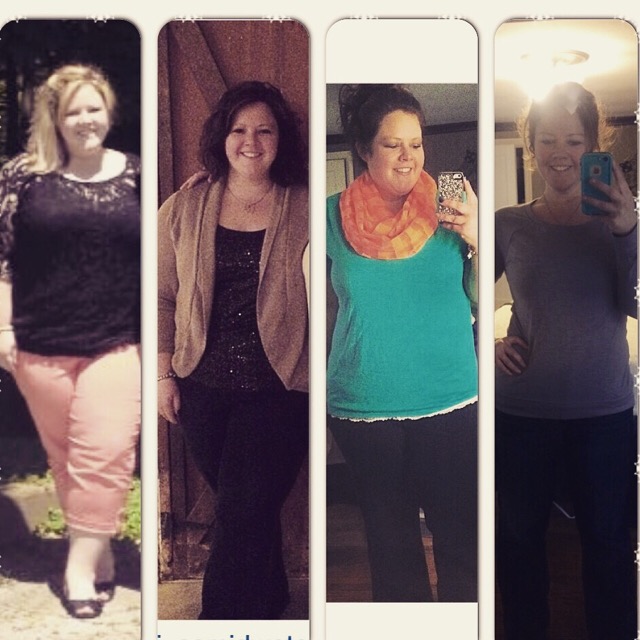
  1. This journey is about progress and having a new tool in your life to help succeed. The far left picture is from May 2013- a few months before I decided to make this WLS journey a reality. Second photo was from a few weeks pre op, third photo was one week post op (was down 10lbs -4.10.14 was surgery date) and the last picture was last week of Jan 2015, weighing -115 lbs less than last January! So happy and proud and yes every day is still a struggle but I'm happy and glad to have this tool to help me stay on track! Good luck to all and awesome job to those who are on the same path!
Trending Products

PatchAid Vitamin Patches

Account

Navigation

Search

Search

Configure browser push notifications

Chrome (Android)
  1. Tap the lock icon next to the address bar.
  2. Tap Permissions → Notifications.
  3. Adjust your preference.
Chrome (Desktop)
  1. Click the padlock icon in the address bar.
  2. Select Site settings.
  3. Find Notifications and adjust your preference.