-
*September Sleevers Check In*
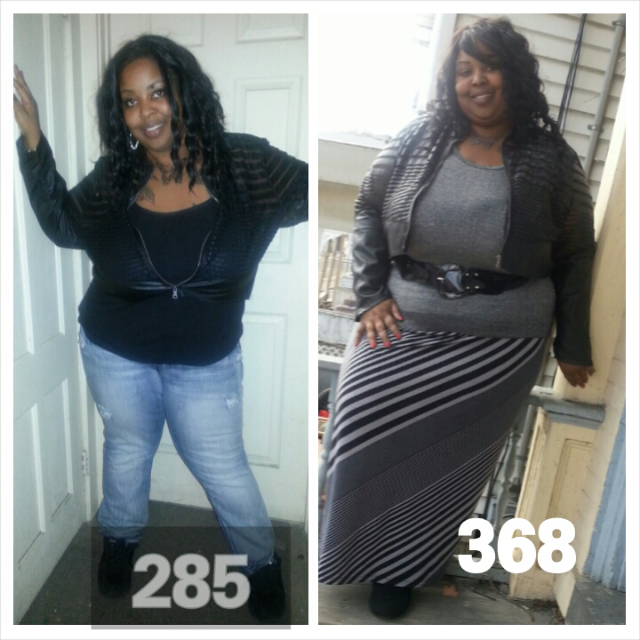
Whooohoo I finally hit my second goal 100 pounds down sleeve date sept 9 ...368 now 268 I have 68 pounds to go
-
-
-
-
-
-
-
-
-
I Want To See Before & After Pics!
-
-
-
Feeling Hunger?
Ok maybe I need to cut down thanks gonna try it
-
Feeling Hunger?
What I meant was from walmart
-
Feeling Hunger?
Its tea already made out of walmart and I also drink real
-
Feeling Hunger?
I'm four months out I eat chicken fish zucchini squash and a whole lot of mushrooms . No breads or anything literally only what I said I eat I'm getting enough to drink but I'm mostly drinking diet tea my nut said maybe not enough protien said eat every two hours ok so now I gained five pounds smh
-
Feeling Hunger?
My god idk what's wrong with me I'm constantly hunger I wonder why
-
*September Sleevers Check In*
Sleeved sept 9.13 sw..368 down 73 pounds
-
New Jersey - Multiple size 3X,24/22 free for pick up
Hi are they still available
-
Anybody Else Cheating?
I admit I kinda cheated I would lick Doritos and bbq Fritos I had to get the craving out my head but I did tell nut she said just don't eat it. At two months I would chew a slice of pizza and spit out.ok I kno it was wrong but I was starving and had to get rid of the craving..but now I'm four months and I'm good all is well I'm down 83 pounds four moths out
-
4 Months Post Op Today
No I don't think so but hey I will try it anything to get rid of it I don't wanna gain the wieght back thanks
-
4 Months Post Op Today
- 4 Months Post Op Today
I never stopped- 4 Months Post Op Today
- 4 Months Post Op Today
No I can't hold to much either but I be so hungry thanks for sharing - 4 Months Post Op Today
Join BariatricPal free
- Ask your own questions
- Reply and follow topics
- Message other members
- No cost, no spam
candys
Gastric Sleeve Patients
-
Joined
-
Last visited
Account
Navigation
Search
Configure browser push notifications
Chrome (Android)
- Tap the lock icon next to the address bar.
- Tap Permissions → Notifications.
- Adjust your preference.
Chrome (Desktop)
- Click the padlock icon in the address bar.
- Select Site settings.
- Find Notifications and adjust your preference.
Safari (iOS 16.4+)
- Ensure the site is installed via Add to Home Screen.
- Open Settings App → Notifications.
- Find your app name and adjust your preference.
Safari (macOS)
- Go to Safari → Preferences.
- Click the Websites tab.
- Select Notifications in the sidebar.
- Find this website and adjust your preference.
Edge (Android)
- Tap the lock icon next to the address bar.
- Tap Permissions.
- Find Notifications and adjust your preference.
Edge (Desktop)
- Click the padlock icon in the address bar.
- Click Permissions for this site.
- Find Notifications and adjust your preference.
Firefox (Android)
- Go to Settings → Site permissions.
- Tap Notifications.
- Find this site in the list and adjust your preference.
Firefox (Desktop)
- Open Firefox Settings.
- Search for Notifications.
- Find this site in the list and adjust your preference.