PapaJames
Gastric Bypass Patients
-
Joined
-
Last visited
-
-
-
-
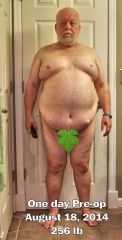
My risque "before" picture. Say goodbye to this guy!
-
I'm scheduled for my RNY on August 19, 2014... very excited! Wanting to document my progress, I shot some photos of myself a couple days ago. Full length front, side, and rear views... all in my birthday suit. I was pretty shocked to say the least! I've got some serious fat rolls! Even though I put censored bars in appropriate places, I'm not so sure that I'll be posting them. I'm ok with it, but I really don't want to offend anyone!
-
66 here and scheduled for Aug 19. I've asked that same question many times and have decided that I want my mobility and health back. Never too late!
-
I'm 66 and got my date too... August 19, 2014. It was a long process getting here, but I'm all finished with the prerequisites, insurance & medicare approved, and starting my two week clear liquid diet next week. All the best for you!
-
I agree... that's exactly how my surgeon explained it. Now to define what "clear liquid diet" really means! My doc mentioned Protein shakes and Lean Cuisines, and 860 calories a day. I'm calling tomorrow to clarify!
-
-
-
@DLCoggin - Thanks for the warm welcome... very much appreciated! @glennr - How encouraging! "It is great to have energy and wear 2X shirts again!! " <--Love it!
-
-
Hi folks... I'm 65 and just now jumping through my pre-op hoops. As far as I can tell, I've got the prerequisites done and am waiting for insurance approval. The earliest I can get scheduled for my surgery is mid-late August and it can't come soon enough! I'm glad to find this wise and mature 60's group!