





cookier224
Gastric Bypass Patients
-
Joined
-
Last visited
Everything posted by cookier224
-
U look great!
-
125 -130 I'm 146 now.
-
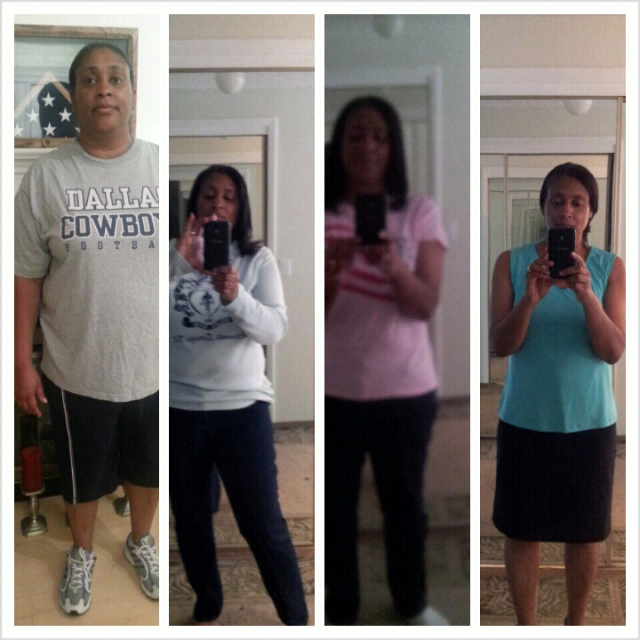
sw 225 cw 146 one more pound i will be at "normal" weight.
-
thank you!you made me smile. i feel younger.
-
I'm 7 months out. down from 225 to 146. from size 18/20 to 10/8 sometimes 6. I am very happy.[ATTACH]3541[/ATTACH]
 cute146 today! So happy! I have 1 more pound and i will be in the normal weight range.welcome to the group. i am 7 months out and have lost 78 pounds. size 8 and 6 now started at 225. I'm so happy!techno Beyonce single ladiesgo girl!CW 147 SW 215 HW 225 DOS 10/3/12 All smiles, loving the new me!Good luck!Wow! Look at you!Looking good girl.So glad ur homeGreat job!U r doing great147! Finally out of the 150's. Lost 78 pounds since 10/03/12. I'm all smiles. Goal 130.So happy for you.
Account
Navigation
Search
Configure browser push notifications
Chrome (Android)
- Tap the lock icon next to the address bar.
- Tap Permissions → Notifications.
- Adjust your preference.
Chrome (Desktop)
- Click the padlock icon in the address bar.
- Select Site settings.
- Find Notifications and adjust your preference.
Safari (iOS 16.4+)
- Ensure the site is installed via Add to Home Screen.
- Open Settings App → Notifications.
- Find your app name and adjust your preference.
Safari (macOS)
- Go to Safari → Preferences.
- Click the Websites tab.
- Select Notifications in the sidebar.
- Find this website and adjust your preference.
Edge (Android)
- Tap the lock icon next to the address bar.
- Tap Permissions.
- Find Notifications and adjust your preference.
Edge (Desktop)
- Click the padlock icon in the address bar.
- Click Permissions for this site.
- Find Notifications and adjust your preference.
Firefox (Android)
- Go to Settings → Site permissions.
- Tap Notifications.
- Find this site in the list and adjust your preference.
Firefox (Desktop)
- Open Firefox Settings.
- Search for Notifications.
- Find this site in the list and adjust your preference.