Kay York
Gastric Sleeve Patients
-
Joined
-
Last visited
-
-
-
-
-
-
-
-
-
-
-
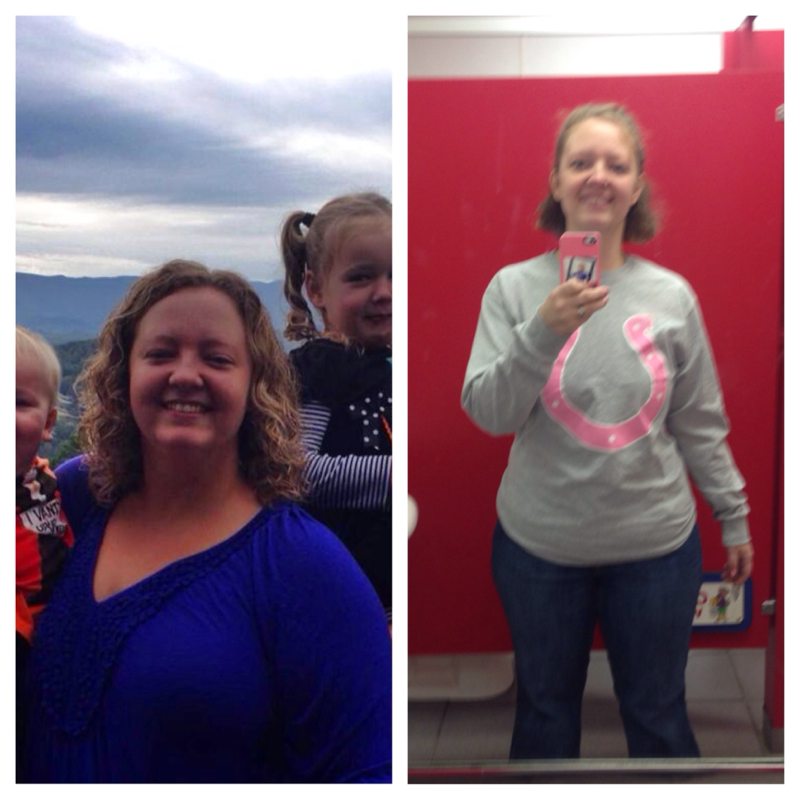
Sw=249 Cw=162 Total=87lbs The first picture is 1 day before surgery, the next picture was last weekend. I am so thankful for this surgery. It has been a blessing to my life and to my kids. My surgery was oct 21

-
-
-
-
If you are going to drink what is the best choice for drink?
-
-
Oh my! I have been eating ranch with carrots! Salsa and hummus sound like great ideas! Any other tips?? What else do you eat? Has anyone are popcorn?
-
-
 Kay York reacted to a post in a topic:
Anyone else tired of THAT question? and Why am I now a weight loss guru?
Kay York reacted to a post in a topic:
Anyone else tired of THAT question? and Why am I now a weight loss guru?
-
Kay York reacted to a post in a topic:
Anyone else tired of THAT question? and Why am I now a weight loss guru?
-
Kay York reacted to a post in a topic:
Anyone else tired of THAT question? and Why am I now a weight loss guru?
-
Chicken unjury is the only one I like!!! Drink it everyday!!
-
-
You all look awesome!! I need to learn how to post some pictures!
-
I eat raw carrots. I will be trying lettuce! Do you use ranch?
-
I hated all protein shakes...except chicken unjury. Tastes like chicken broth. I drink it warm everyday! The warm stuff goes down easier than cold for me also!
-
Oh I see 4.5 months out. I am almost 5 months out
-
What do you get all on the subs? How far out are you? I was told not to eat lettuce??
-
-
My friends tell me I look good and they are thinner. I am interested to see what happens when I pass them on the scale. I hope they will still be happy for me!
-
I thought I was too:) it's amazing to keep loosing. Thanks for sharing about calories!
-
I ended up going to the hospital a week after that post. I was there Friday-Monday (Monday was a holiday) I had an ulcer and the bottom of my esophagus had skin grown over it. It was sick! They punctured it when they did an endoscopy. I had a lot of bile and stomach acids in my stomach and couldn't digest very good. I had tons of vitamin bags and low sodium, vit k and b1. Also very dehydrated. I am still on ulcer medication but I can eat and feeling much better!
-
My throat hurts and chest. I haven't been sick with a cold since surgery 10-21-13. What do I take?
-
10/21/13 Sw:249 Cw:185 64 lb total. I get nausea easy and am not getting enough fluids and protein.
-
We have been on a level 3 all day and I really cannot drive over an hour to my dr. The wind chill is -40 and we have lots of snow here. This has been going on for 2 weeks so I am going to try to wait until Friday, because I started a new job last week and am afraid they will hospitalize me when I go to the doctor for dehydration. I think I am feeling this way because of dehydration. I am going to try to drink more till then.