





nursemeg89
Gastric Sleeve Patients
-
Joined
-
Last visited
Everything posted by nursemeg89
-
nursemeg89, a weight loss surgery photo album by nursemeg89 on BariatricPal. 6 photos in Before and After Gastric Sleeve Photos.
-
Thank you all so much for your kind words and support
-
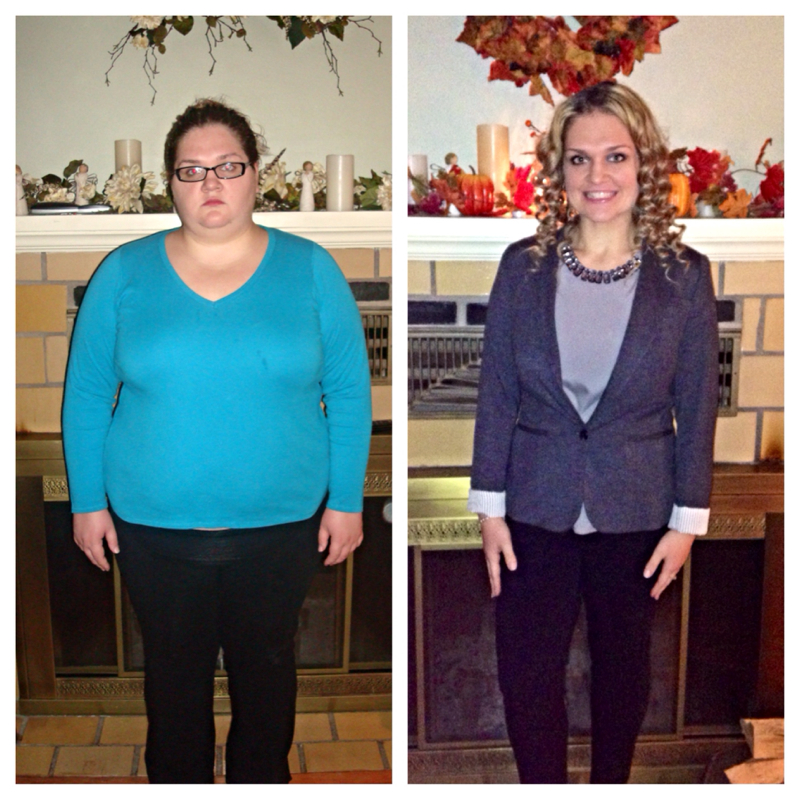
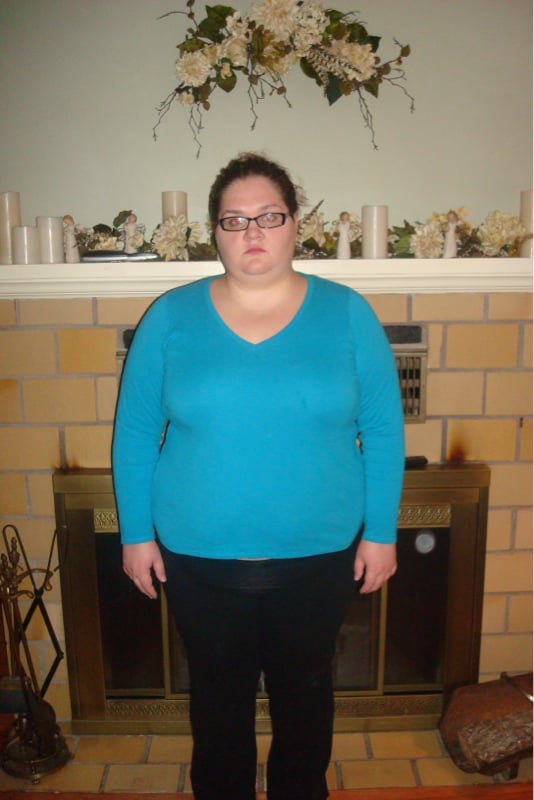
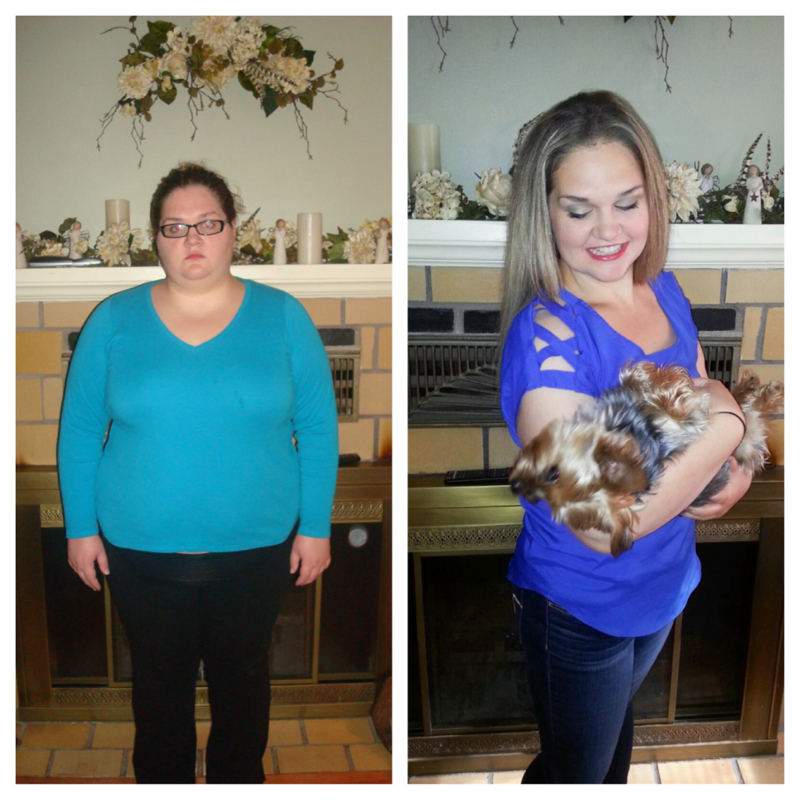
Today, November 19th 2013 marks one year since my sleeve gastrectomy! I am 140 pounds down and without any regrets! I am so grateful that I had this second chance at a healthy life!!!!! I took some time today to recognize my friends and family for all of the incredible support and encouragement that I've been provided with during this amazing journey. Nothing about this adventure has been easy, but it certainly has been worthwhile. <3 The picture left is me BEFORE, one year ago at my highest weight- 296 pounds. The right is me NOW at 156 pounds. I still want to lose about 16 more to weigh in at 140 pounds
-
Thank you!Congrats on your sleeved success! I'm 7 months post-op and recently put up a thread with a new picture! Great minds think alike! Keep up the great workI started working out as soon as my MD gave me the go ahead. Right now 3-4 days a week working out. I don't have a calorie range. I do mostly classes at the gym so I always work out for about 50 mins to an hour at a time. Nothing crazy, I am actually looking to increase my exercise!Nope! No plastics or further surgeries for me all natural lolThank you all so much! For tips I just to stick to the basics...get 60-80g protein in and watch carb Intake. I am active at the gym, I love spinning classes!!I am 7 months post-op, down 126 pounds and happier than ever! I want to lose 20 more pounds to be at my goal weight! Starting weight- 296 pounds Current weight- 170 pounds
 Date of surgery- November 19, 2012 Highest weight- 296 Current weight- 175 121 pounds lost in 7 months!!!! I couldn't be happierI met my "summer birthday goal" early!!!! I turn 24 Tuesday June 11th and my goal was to be at 175 by then- I did it!! Pre-op weight- 296 pounds Current weight- 175 pounds Surgery date- November 19, 2012 (7 months 121 pounds GONE) End goal weight- 150 poundsGreat job! U are doing awesome!!! I have 2 more pounds to lose before June 11th to reach my 24th birthday goal of 175!!!Thank you I have about 30 more pounds I want to lose! Good luck on June 6th, it will be here before you know it!!!!!!Thank you! I'm 5'3"Before- 296 pounds. "Current" 179 pounds. Surgery date November 18,2012. 6 months ago!
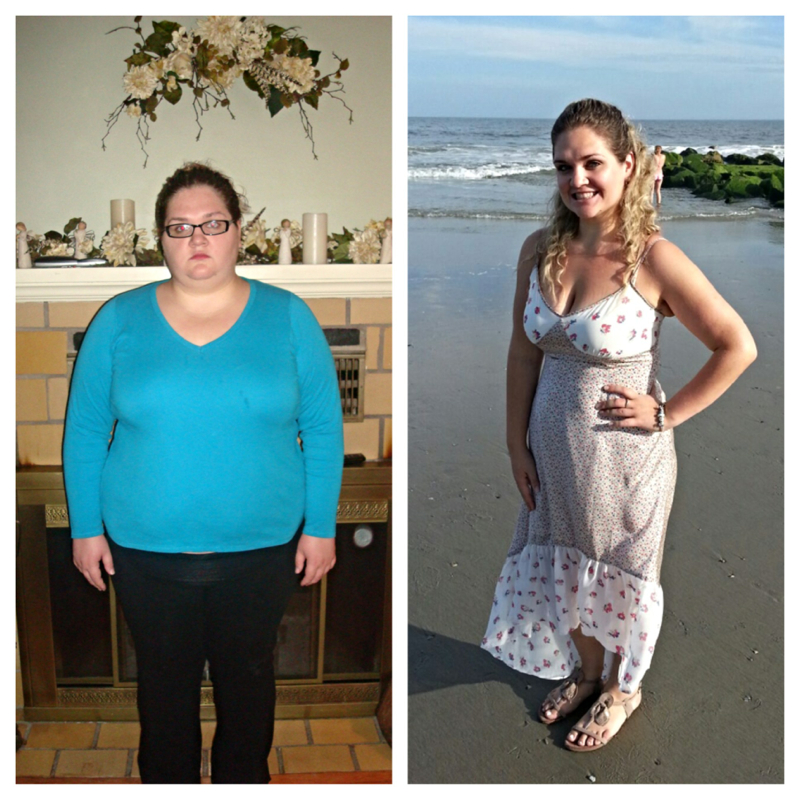
 To all: Thank you so much to all for the incredible support that you always show me! In response to a lot of questions- when I'm motivated I will definitely type out my daily food intake. I think ill track and post this week. Also, I am 23 years old, turning 24 next month.I am 5'3" don't have much loose skin at all, would like to tighten up arms and lower abdomen more at the gym but it's nothing I am concerned about. I work out frequently, my favorite workout is spinning classes which I attend 2 times a week. Also do some body sculpting classes which incorporate a lot of lighter weight training with some cardio. Thank you for the complimentNovember 2012 of course sorry. Just came off a nightwork and am leaving a lot to be desired with brainpower. Yes I go to my 6 month appointment this week!Hey guys! Took some pictures this past weekend and noticed a lot of progress so I wanted to share!!! My stats: -starting weight: 296 -surgery date: November 19,2012 Current weight: 180 30 MORE POUNDS TO GOAL Me on the right: Before and current:
 Congratulations!!!!!!!!! So happy for you!Thank you! My dog says thanks tooI am short 5'3" but carry weight fairly well. I am a size 10 pants and medium tops at 184 pounds.








Account
Navigation
Search
Configure browser push notifications
Chrome (Android)
- Tap the lock icon next to the address bar.
- Tap Permissions → Notifications.
- Adjust your preference.
Chrome (Desktop)
- Click the padlock icon in the address bar.
- Select Site settings.
- Find Notifications and adjust your preference.
Safari (iOS 16.4+)
- Ensure the site is installed via Add to Home Screen.
- Open Settings App → Notifications.
- Find your app name and adjust your preference.
Safari (macOS)
- Go to Safari → Preferences.
- Click the Websites tab.
- Select Notifications in the sidebar.
- Find this website and adjust your preference.
Edge (Android)
- Tap the lock icon next to the address bar.
- Tap Permissions.
- Find Notifications and adjust your preference.
Edge (Desktop)
- Click the padlock icon in the address bar.
- Click Permissions for this site.
- Find Notifications and adjust your preference.
Firefox (Android)
- Go to Settings → Site permissions.
- Tap Notifications.
- Find this site in the list and adjust your preference.
Firefox (Desktop)
- Open Firefox Settings.
- Search for Notifications.
- Find this site in the list and adjust your preference.