-
-
August Challenge
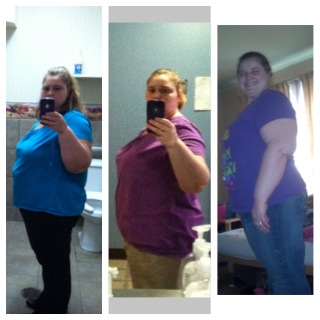
Name, real or screen~ sommers4977. Goal weight for August 31st~ 230. Weight on August 1st~238 Age~ 35 City/State~ Ny. Dietary goal for August~ Up water. Exercise goal for August~ Join gym. Personal goal for August~ get mire motivated Date banded~ 10/3/2012. Total weight loss since banding/pre op diet~ 62. Favorite End of Summer Activity~ school shopping with kids
-
I was banded on____since then I have lost____!
I was banded 10/3/2012 and since i have lost 58 pounds
-
Anyone from nj?
Washington ciunty
-
-
-
Please pist success pics!
Wow good job
-
Please pist success pics!
U look amazing
-
113 lbs down. Pics before & after!!
Wow amazing job :-)
-
October Bandsters?
60 pounds not 6
-
October Bandsters?
Im down 6 pounds. I have 5.6 cc un my band and am finally at my green zone whoohooo
-
Anyone in Upstate???
- Please pist success pics!
Wow thats awesome- Please pist success pics!
- Please pist success pics!
- Does anyone need size 16, 20 and 22 clothes?
I resent my address did u getit- Does anyone need size 16, 20 and 22 clothes?
I messaged u thanks so much :-)- Does anyone need size 16, 20 and 22 clothes?
I could use the 20s
Join BariatricPal free
- Ask your own questions
- Reply and follow topics
- Message other members
- No cost, no spam
Account
Navigation
Search
Configure browser push notifications
Chrome (Android)
- Tap the lock icon next to the address bar.
- Tap Permissions → Notifications.
- Adjust your preference.
Chrome (Desktop)
- Click the padlock icon in the address bar.
- Select Site settings.
- Find Notifications and adjust your preference.
Safari (iOS 16.4+)
- Ensure the site is installed via Add to Home Screen.
- Open Settings App → Notifications.
- Find your app name and adjust your preference.
Safari (macOS)
- Go to Safari → Preferences.
- Click the Websites tab.
- Select Notifications in the sidebar.
- Find this website and adjust your preference.
Edge (Android)
- Tap the lock icon next to the address bar.
- Tap Permissions.
- Find Notifications and adjust your preference.
Edge (Desktop)
- Click the padlock icon in the address bar.
- Click Permissions for this site.
- Find Notifications and adjust your preference.
Firefox (Android)
- Go to Settings → Site permissions.
- Tap Notifications.
- Find this site in the list and adjust your preference.
Firefox (Desktop)
- Open Firefox Settings.
- Search for Notifications.
- Find this site in the list and adjust your preference.