riojen
LAP-BAND Patients
-
Joined
-
Last visited
-
-
-
Thank you so much!! It really means a lot!
-
-
-
-
-
-
-
Good luck with your upcoming surgery!! I am also from Texas! Houston, Texas to be exact. I'm six months out and wouldn't change a thing!
-
70lbs is a lot of weight in 4.5 months!! You should be proud!! A way I get out of slumps is to hire a personal trainer to motivate me. They are great coaches and push you, and they want you to succeed!! 24 hr fitness usually had a 3 pack for $99 to start. It's worth a try!!
-
Good luck!!
-
-
-
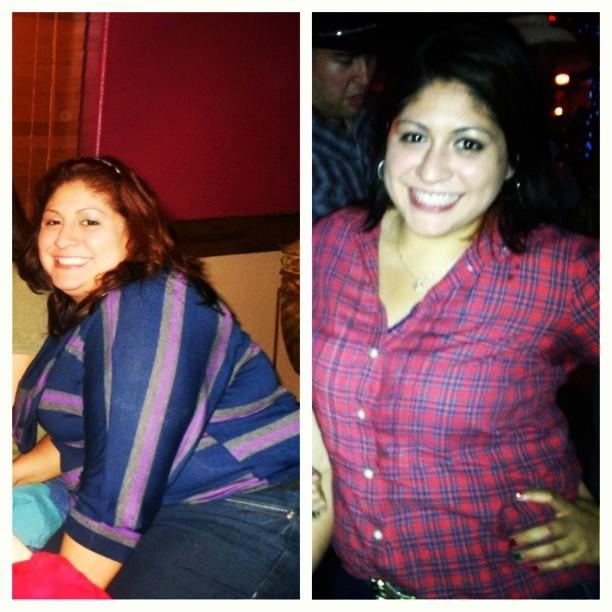
It's been six months since my sleeve surgery (6-12-12). It's been up and down, but mostly up. I'm incredibly pleased with my 75 lb. weight loss. Yes, 75 lbs! I feel like a completely different person. I have 25 more pounds to my goal of 100 lbs. lost. I not only used the surgery as a tool to eat a considerably less amount of food, but I hired a personal trainer to help me tone and ward off the potential weight gain from old habits that don't seem to go away. Yes, it is almost impossible for me to consume amounts of food like I used to, but its the wrong kinds of foods you must be aware of! If there is anyone on the fence about this surgery, you have every rig to be scared or to wonder if this is right for you. It isn't right for everyone. You can really hurt yourself if you don't listen to your body! It took me awhile to realize the pain in my chest, that was my body telling me I'm full and I need to put down the fork, NOW! At times I would get sick, and you learn. I stay away from most breads and rices because they just aren't worth it to me, and they are carbs, so it is a win/win! I get the occasional criticism, "oh, you cheated," or "it was the easy way out." Look, you go lay in that hospital bed after I woke up from having major surgery, and we'll discuss what was the easy way. It hurts. It's hard. It's also expensive. But it's worth it. I would be 27 with diabetes and high blood pressure, hitting the scale at around 250-260. I think I did what was best for me. Thank you for listening. And to whoever set up this site, thank you. Before and after my surgery, I checked this app daily. It was extremely useful!

-
M five weeks post op and just recently every time I eat, I get this feeling of food coming up with mucous when i swallow. Has anyone felt this? What can I do to prevent/relieve it?
-
Oh and I had my surgery on June 12th and lost 20 lbs before surgery on the liquid diet... After surgery I lost another 15 lbs for a total of 35 lbs... But I've lost inches all over!
-
I was released from te hospital after a two day stay and put on full liquids for two weeks and then two weeks of puréed. I was told I could have alcohol six weeks after surgery. They frown upon it because it's liquid calories. I am 27 years old and would like to have a glass of wine every now and again.
-
Thanks guys! I took some chewable gas x and feel a bit better. I still have some spasms, but I think you guys are right about everyone just being scared of a leak. I just have to put faith in my surgeon and follow his instruction. Thanks! Oh and so far I list 20 lbs with the pre-op diet and 5 more since the surgery.
-
I'm so terrified of a leak. My doctor said I can be on full liquids for two weeks and then go to puréed foods for two more. I scared myself today because I had broccoli cheese soup and had a cramping/spasm feeling on my stomach area I hadn't had since the first day I got out of surgery. Up until then I've had only a little discomfort when using my core muscles because they are sore obviously. I've been walking and trying to get my liquids down pretty good. What does a leak actually feel like? Is it triggered by liquids like soup?? And I've looked up some ways to detect it and barium was suggested... What of my doctor never made me drink barium... Are you supposed to do this before you leave the hospital?
-
I'm on my pre-op restricted diet. Low sugar/carbs and high protein. the last couple of days I've had pains below my breast bone in my stomach area. Almost like contractions, but not like those of mentrual cramps a bit higher in my abdomen. Are these intense hunger pains? I thought I was over the head hunger, and I'm over weight and never really experienced hunger pains before, I don't think. Should I be worried?