btan302
LAP-BAND Patients
-
Joined
-
Last visited
-
-
-
-
-
Congrats on your success as well
-
Thank you everyone
-
-
Try some hot tea
-
Thank you still a long way to go but I will keep pushing my self
-
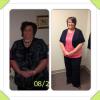
I have loss almost 100 pounds but could not tell intill I took this pic
-
-
-
My dr said that we need to slow down eating cause we're getting to much air
-
-
-
-
Well I was down 11 more pounds since my first fill dr only gave me 1 cc now I have 2 cc in my band I was hoping for more
-
Lucky for you I bet you will lose alot
-
Wow Donna I only have one cc in me and I don't go back till aug 22nd
-
I wAs banded on 29th of May also since surgery I'm only down 18 pounds but I'm working out almost five days a week I did 20 miles of cardio last week so that's more then I have done on years. I'm scared the scale isn't going down fast enough but I can tell in my clothes that I'm losing
-
Yea they said if you start to feel hungry to call and they will move my fill up
-
It wasn't as bad as I thought I just hope I stay full my next one isn't intill aug 22nd. Since I started this journey 8 months ago I'm down 60.2 pounds but since surgery on May 29th I have loss 22 pounds.
-
Banded on May 29th started working out June 7th up to 45 min on treadmill walking at a pace of 3.2 5 days a week tomorrow I get weighed and I get to start solid foods tomorrow. What are your work outs?
-
Banded on May 29th started working out June 7th up to 45 min on treadmill walking at a pace of 3.2 5 days a week tomorrow I get weighed and I get to start solid foods. What's everyone workout l plan?
-
The cardiac rehab at the hospital where I had my surgery is meeting with me on Thursday I was banded on 5/29 to set up a workout program I'm so excited I never had anyone really tell me how to work out so this will be great