York
LAP-BAND Patients
-
Joined
-
Last visited
-
test42
-
If you don't see the button, please try this: Right click on the tools icon in the upper right (the gear), choose command bar. A new toolbar should appear with several icons and Page, Safety and Tools. Click on the Tools menu, compatibility view and compatibility view settings should be listed. Note: If your computer is part of a network at an organization such as a school, government agency, or a business, your organization's system administrator might have turned on Compatibility View for all websites by using Group Policy. In this case, you may not be able to change this setting.
-
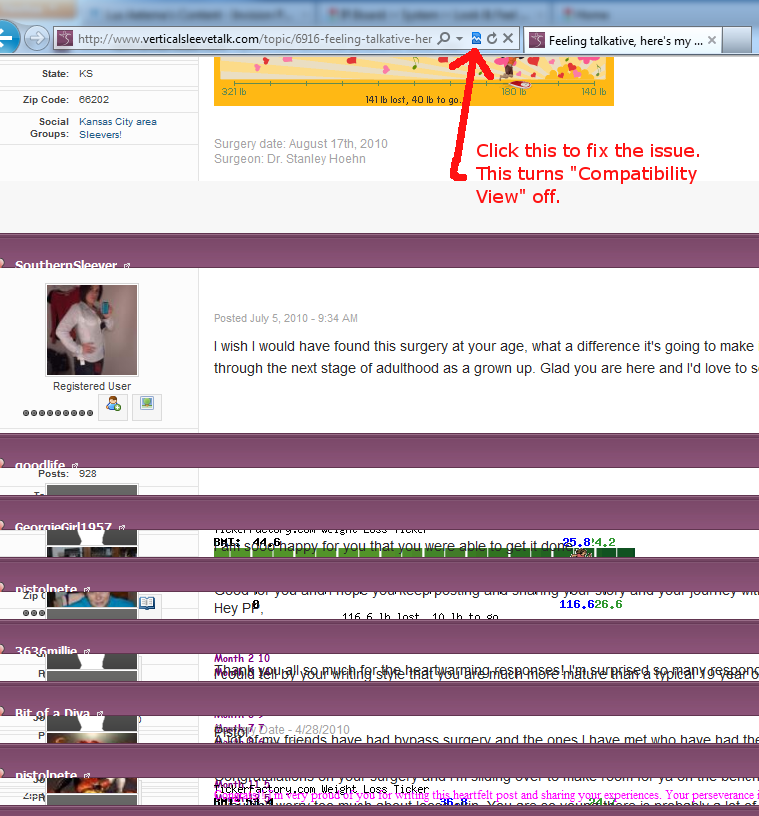
Hi, to fix this problem, please turn off "Compatibility View" in IE9. Here is a screenshot that shows where the icon is located and instructions to turn off: If you don't see the button, please try this: Right click on the tools icon in the upper right (the gear), choose command bar. A new toolbar should appear with several icons and Page, Safety and Tools. Click on the Tools menu, compatibility view and compatibility view settings should be listed. Note: If your computer is part of a network at an organization such as a school, government agency, or a business, your organization's system administrator might have turned on Compatibility View for all websites by using Group Policy. In this case, you may not be able to change this setting. Please let me know if this resolves the issue you are experiencing. Thank you :smile1:
-
Hello, if you are experiencing this issue, may you provide your Browser and version? (For example: Internet Explorer version 9) From Internet Explorer you can click "About Internet Explorer" from the menu (may be under Help sub-menu) and it will show the version you have. From Firefox click on "About Firefox" from the Help sub-menu to find the version. Other browsers usually have the same type of version information in the same place (if you are using Chrome, Opera, etc.) Thanks :smile1:
-
Hello, when creating a new topic, at the top-right click "Manage Topic Poll" and you can create your poll that way
-
-
-
-
-
Hello, the reputation points are earned when someone clicks to "Like This" button. Each "Like This" click by a single user earns 1 reputation point. This can be for posts in topics, photo comments, blogs, etc.
-
You may try upgrading your browser to the latest version (Internet Explorer version 9). That may fix the issue
-
Hello, after taking a look at the screenshot you posted, the problem may be a bug related to the zoom being 125% (instead of 100%). May you test changing the zoom to 100% (bottom-right of browser option) and see if this fixes the problem? Also, may you provide your browser version? I'm guessing Internet Explorer version 8? This can be displayed by clicking "Help" then "More About Internet Explorer". Thank you :smile1:
-
Hello, may I recommend trying out the "View New Content" feature (located to the left of the Search bar at the top). This enables you to filter/search by content you have not yet read, content that is new since your last visit, or content posted in the last 24 hours, week, etc. Also, the "Mark This Forum As Read" option is located to the left of the "Start New Topic" button located on the Forum Category pages when viewing the topics. I hope this helps :smile1: