




Skip to content
View in the app

A better way to browse. Learn more.

BariatricPal

A full-screen app on your home screen with push notifications, badges and more.

To install this app on iOS and iPadOS
  1. Tap the Share icon in Safari
  2. Scroll the menu and tap Add to Home Screen.
  3. Tap Add in the top-right corner.
To install this app on Android
  1. Tap the 3-dot menu (⋮) in the top-right corner of the browser.
  2. Tap Add to Home screen or Install app.
  3. Confirm by tapping Install.

Lunch...

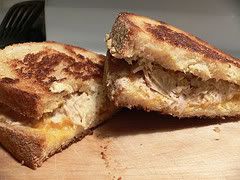
So as I was a good little girl this morning... drinking my chalky protein shake. But then... my dad asked me to lunch (He and I work for the same compnay - my family owns and operates a petroleum company)... so I go to lunch and look at what I had...
392104439_cea10cbffa_m.jpg

I know it looks bad, but it was good... I think I will just take it easy too night and just have another protein shake. I need to quit going to lunch with my dad! :violin: Excuses Excuses... I know. I will stop it. And just take control of my own life!

1 Comment

Recommended Comments

Shaniqwaaa

LAP-BAND Patients

So as I was a good little girl this morning... drinking my chalky protein shake. But then... my dad asked me to lunch (He and I work for the same compnay - my family owns and operates a petroleum company)... so I go to lunch and look at what I had...

392104439_cea10cbffa_m.jpg

I know it looks bad, but it was good... I think I will just take it easy too night and just have another protein shake. I need to quit going to lunch with my dad! :violin: Excuses Excuses... I know. I will stop it. And just take control of my own life!

Guest
Add a comment...

Account

Navigation

Search

Search

Configure browser push notifications

Chrome (Android)
  1. Tap the lock icon next to the address bar.
  2. Tap Permissions → Notifications.
  3. Adjust your preference.
Chrome (Desktop)
  1. Click the padlock icon in the address bar.
  2. Select Site settings.
  3. Find Notifications and adjust your preference.